3-Newcomer
December 13, 2024
Solved

Problem for tracing families of curves with variable parameters

  • December 13, 2024
  • 1 reply
  • 1333 views

Hello everyone,
I am a new mathcad user. I used to use python but we switched to mathcad prime 9 recently. I'm having a lot of trouble carrying out simple tasks with mathcad. It's certainly my beginner level on the software that explains this. I'm calling on your expertise to help me on a few points. Sorry if for you it's trivial but for me on mathcad it's really complicated at the moment. Here's my problem: I want to retrieve data from a calculation. I've written several fairly complex functions and I want to vary some of the parameters of these functions and retrieve the values. I then want to use Excel to plot the curves of these functions. I want to compare the curves for a given parameter, so as to visualize the impact of a parameter on the function.

Mathcad Prime 9.0

Best answer by Werner_E

1) To make the finals S.. functions dependent on the variable parameters you have to make all functions involved to define these final function dependent on these parameters. Of course only if the intermediate functions also depend on that parameter. In case of your function Sd the parameter a1 seems only be introduced in the final definition of a1.
Using the parameters as additional function argument of the intermedeate function was shown in my previous sheet with functions f1 and f2 which finally make up function f3 and share a parameter a.


2) To plot the final function I suggest that you use the CreateMesh function as already shown in my sheet. You have to provide ranges for x and y to do so and optional grid size arguments.


The problem may be that CreateMesh fails if just one combination of x and y within the range provided returns a non-real result or runs into a calculation error (e.g. 'division by zero').

These problems could be trapped by a asking if the imaginary part of the function result is non-zero and by using  the try...on error... statement.


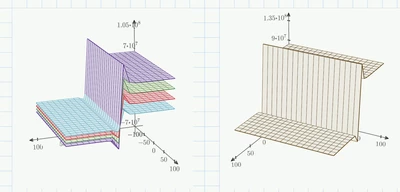
See a possible way to do this for your function Sd with various values for parameter a1 in the attached sheet.

Werner_E_0-1734150313856.png


According the data export to Excel I already had shown in my previous sheet that you have to create vectors/matrices in Prime and then use WRITEEXCEL to export them.

1 reply

25-Diamond I
December 13, 2024

What do you mean by this:

Werner_E_0-1734108649278.png


Furthermore I am missing the definitions of functions f1 and f2.


Your further examples on the pages thereafter seem to not use the variable a1 which you say is the variable you want to vary.


Can you provide a simple consistent worksheet showing just one example of what you would like to achieve?


Find attached a simple example of a function in two variables, based on one parameter a and constructed by combining two function in one variable,  maybe its helpful.


3-Newcomer
December 14, 2024

Thank you for your reply. I can see that I still have a lot to learn before I can produce work of the quality of your reply. I'll try to be a little clearer in describing my problem. I've completed the description of my problem in a pdf file that I'm attaching to the post

Werner_E25-Diamond IAnswer
25-Diamond I
December 14, 2024

1) To make the finals S.. functions dependent on the variable parameters you have to make all functions involved to define these final function dependent on these parameters. Of course only if the intermediate functions also depend on that parameter. In case of your function Sd the parameter a1 seems only be introduced in the final definition of a1.
Using the parameters as additional function argument of the intermedeate function was shown in my previous sheet with functions f1 and f2 which finally make up function f3 and share a parameter a.


2) To plot the final function I suggest that you use the CreateMesh function as already shown in my sheet. You have to provide ranges for x and y to do so and optional grid size arguments.


The problem may be that CreateMesh fails if just one combination of x and y within the range provided returns a non-real result or runs into a calculation error (e.g. 'division by zero').

These problems could be trapped by a asking if the imaginary part of the function result is non-zero and by using  the try...on error... statement.


See a possible way to do this for your function Sd with various values for parameter a1 in the attached sheet.

Werner_E_0-1734150313856.png


According the data export to Excel I already had shown in my previous sheet that you have to create vectors/matrices in Prime and then use WRITEEXCEL to export them.