11-Garnet
June 14, 2024
Solved

Problems with interpolating data in Mathcad

  • June 14, 2024
  • 2 replies
  • 1983 views

Hi everyone,


I have a problem with interpolating data in Mathcad. Please see the attached file. In Excel, I have defined materials and temperatures. I want to replicate this in Mathcad so that when I select the material and temperature, the corresponding stress value is automatically displayed. Additionally, for temperatures ranging from 100 to 250, if I select a temperature like 120, the stress value should be determined through interpolation based on the material and temperature.


I have also attached my Mathcad file. I approached this in two ways: The first method works for standard temperatures like 100 and 150 but shows an error if I select a temperature like 120 that is not explicitly defined. The second method involves interpolation but only for one material. If I have multiple materials, I have to repeat the process for each one.


If anyone has encountered and solved this issue before, please let me know.


note - these materials and temperatures are not standard and are used only for demonstration purposes.

Best answer by Werner_E

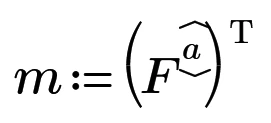
Simply use

Werner_E_0-1718362442850.png

in your second method!

The row selector choses row #a in the data matrix corresponding to the material selected via the drop down and the transpose operator turns the row vector into a column vector which is needed for "linterp" to work.

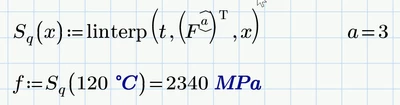
You may also bypass the definition of the variable "m" and use that expression directly in the "linterp" function:

Werner_E_1-1718362668107.png


2 replies

Werner_E25-Diamond IAnswer
25-Diamond I
June 14, 2024

Simply use

Werner_E_0-1718362442850.png

in your second method!

The row selector choses row #a in the data matrix corresponding to the material selected via the drop down and the transpose operator turns the row vector into a column vector which is needed for "linterp" to work.

You may also bypass the definition of the variable "m" and use that expression directly in the "linterp" function:

Werner_E_1-1718362668107.png


11-Garnet
June 17, 2024

Hi Werner,


Thanks for this solution. I made some changes, according to me. Please see the attached Mathcad file.

ttokoro
21-Topaz I
21-Topaz I
June 17, 2024
ttokoro
21-Topaz I
21-Topaz I
June 14, 2024

image.png f/ MPa for 2220 MPa line.

t.t.