
4-Participant
May 14, 2020
Question

Programmatically create variable names and assign values from Excel spreadsheet (MCD15)?

  • May 14, 2020
  • 4 replies
  • 7927 views

Hello,

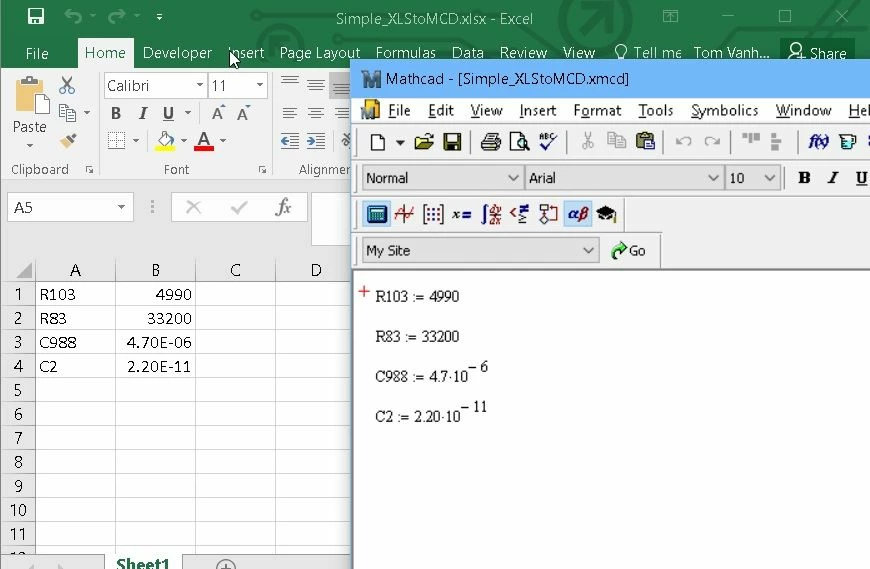
I wonder if anybody can suggest a means to programmatically create variable names and assign values to them, using data from an Excel spreadsheet? I have attached a very simple example to illustrate what I want to do. I have electronic component identifiers (Reference Designators) in column A, and the corresponding values for those components in Column B. I would like the values in column A to become variable names in Mathcad, and the values in column B to become the values of these variables. In the example below, I have manually created the variables in Mathcad, but I would like to automate that.  Seems pretty simple, but I haven't figured out how to do it. Any suggestions would be greatly appreciated! Thank you.Excel_to_Mathcad_Illustration.jpg
4 replies

23-Emerald V
May 15, 2020

As far as I'm aware, Tom, there is no way of programmatically creating names in a straightforward fashion. 


I've asked for such a feature several times over the years, but it's not appeared yet.  There have been other user requests for this feature, eg.


https://community.ptc.com/t5/PTC-Mathcad/Create-variable-names-automatically/m-p/574404


Coincidentally, I recently (Apr 2020) followed up an Alfasoft article on Unicode character creation by asking Alfasoft about this capability.   They said that they had had similar requests from other customers, didn't know whether it was on PTC's development path for Mathcad, but would forward my request to PTC.


https://support.alfasoft.com/hc/en-us/articles/360003722078-How-to-add-things-on-top-of-characters-used-as-variable-names


With a createName type function, it would be straightforward to vectorize it over a list of names imported from Excel.


Stuart


From my letter to Alfasoft:


Thank you for posting the referenced article - it was interesting and solves a particular problem that several have had over the years. However (there’s always a ‘however’, isn’t there?), the process of adding a constructed character or name by copy & paste is somewhat mandraulic, not to mention “copy&paste” errors being a somewhat notorious and common phenomenon. On the face of it, the process would seem to be better suited to automation.


Could a feature request please be raised to add a function to Mathcad Prime 6 that takes a string and creates a new name (variable/function) on the left-hand side of a definition and which is then available for use 'later on' in the worksheet?


Eg, make a name ...


newName:=concat("var",num2str(1))
newName = "var1"

or

newName := stack(97,0x0333)
newName = "a̅0̳"


followed by creating the name, 


createName(newName) := <expression>


This would have the effect of manually typing/pasting a name and be fully equivalent to var1 := <expression>.


Used on the rhs, or as a function parameter, createName would not create a name but would stand in place of the name var1.


Other options might be to prefix 'newName' with an operator (eg, @ or 🄋 (or even🗃or 🗄!) - available via the ribbon) to identify a name indirection, eg


( 3 + 🄋newName == 3 _ var1)


(Suspicions that I might be subtly asking for a macro capability are, I am sure, completely unwarranted. Indeed, the thought has never so much as passed through my head …)


From a subsequent worksheet I was playing around with to create complex names, and a candidate for a function like createName,


2020 05 15 A.png


21-Topaz II
May 15, 2020

Hi,


You can sort of do it like this:

Capture.JPG

Cheers

Terry

21-Topaz II
May 15, 2020

Hi,

Forgot to show you can get myVariables direct from an Excel component.

Capture.JPG

21-Topaz II
May 21, 2020

Hi,

But, by chance, you are looking for something like this (it can be developed to make it more automatic):

TVH answer.jpg

4-Participant
June 8, 2020

I think I found a solution to the second half of my problem... that of programmatically CREATING a variable in Mathcad: AutoHotKey (https://www.autohotkey.com/). The simple example below shows a program in AutoHotKey that creates 4 variable in Mathcad when Ctrl-K is pressed. I still have a lot to figure out with regard to opening a file and parsing it in AutoHotKey, but I am confident that it can be done. This might not be the most elegant solution but  I think it will accomplish my objective. Thanks again for the suggestions.

Creating_Mathcad_Variables_with_AutoHotKey.jpg

21-Topaz II
June 8, 2020

Hi,


Good bit of research.

Visual Basic in Excel had a similar SendKeys method.


Cheers

Terry