Programming a loop to seek specific cells from an excel file
Hello everyone,
I am trying to figure out if what we would like to do is ever possible. Please let me paint the picture first.
I have a matrix in an excel file. something like this
| Mat/Temperature | -20 | -15 | -10 | -5 |
|---|---|---|---|---|
| Mat1 | Value1 | Value2 | Value3 | Value4 |
| Mat2 | Value5 | Value6 | Value7 | Value8 |
| Mat3 | Value9 | Value10 | Value11 | Value12 |
| Mat4 | Value13 | Value14 | Value15 | Value16 |
| Mat5 | Value17 | Value18 | Value19 | Value20 |
The table above is just for illustration, Our table is very large, we call it our Material Database.
The idea is as follow,
When an engineer needs to perform a certain type of calculation, he or she will open a MathCAD template and select the appropriate material and temperature at which he or she wants to perform a certain type of calculation.
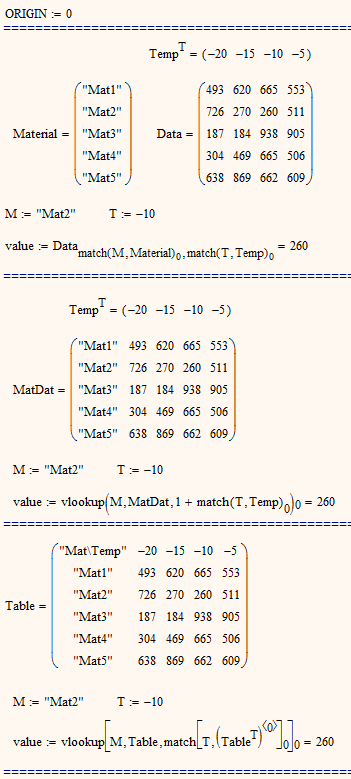
MathCAD should then identify the correct cell in excel and return into MathCAD the correct value.
The idea is to have two loops. One to identify which raw. eg if I select Mat3, the program will check in Column A and start with the first cell. Does A2 = Mat3 ? No, check next line, Does A3=Mat3? No etc... until there is a match. Here it will be A4. It means that we are here interested in row 4.
The second loop is to identify the correct column. If the user selected Temperature -10, following the same logic as above. Does B1=-10? No, check next column, Does C1=-10 ? No etc... until there is a match. Here the match will be D1.
Now the row and column have been identified row 4 and column D. Therefore the value that is required for the MathCAD calculation is in the cell D4 ie Value11
Is that even possible to do in MathCAD ?
I know how to get a value from excel for instance using READEXCEL("..\..\excelfile.xlsx","Worksheet1!D4")
Our challenge for now is to be able to have D4 as a variable and to get this variable calculated using the above described loops.
I was just wondering if that is even possible before we spent days of trying to figure out.
Thanks
Best regards