1-Visitor
March 3, 2017
Solved

Programming a Z-score Table

  • March 3, 2017
  • 2 replies
  • 10285 views

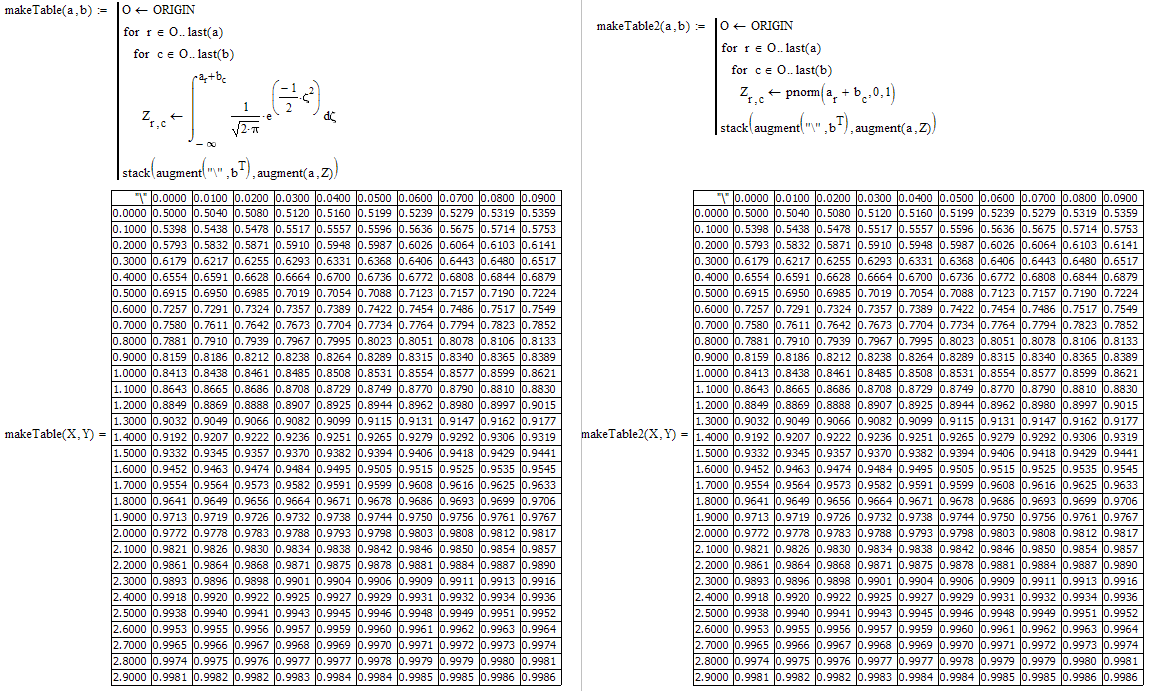
Hi, I need assistance debugging a program to build  a Z-score table with the intention to reproduce in Mathcad a z-score table very similar to the one that we could create with an excel spreadsheet. This just for fun!

See attached files.

Thank you

juan

Best answer by Werner_E

> I used the integral instead of the function pnorm because this is the only way that I can funnel the sum of the vectors X & Y into the limit of integration Z.

I see no problem in using that sum as argument of the pnorm function.

> Your suggestions of modifying T did not work for me

Additionally you have to use Z instead of T in the last line. After all you want a Z-table, not a T-table 😉

Regards

Werner

2 replies

25-Diamond I
March 3, 2017

Why do you post a pdf and not the worksheet itself??

Guess you should use T[r,c as upper limit of your integral in makeTable and not simply T.

Better way is to write T <--  a[r + b[c and then use T as upper limit as you have. No need to create a vector T.

Why do you program the integral yourself? Mathcad provides the "pnorm" function!

jsuarez1-VisitorAuthor
1-Visitor
March 3, 2017

Hi Wegner,

Finally I could upload the Mathcad file now. I tried many times at the time of sending my post without success. Here is the file to be look at.

I used the integral instead of the function pnorm because this is the only way that I can funnel the sum of the vectors X & Y into the limit of integration Z.

If you can do it using  both methods is excellent, then I could compare both of them

Your suggestions of modifying T did not work for me

thank you!

juan

Werner_E25-Diamond IAnswer
25-Diamond I
March 6, 2017

> I used the integral instead of the function pnorm because this is the only way that I can funnel the sum of the vectors X & Y into the limit of integration Z.

I see no problem in using that sum as argument of the pnorm function.

> Your suggestions of modifying T did not work for me

Additionally you have to use Z instead of T in the last line. After all you want a Z-table, not a T-table 😉

Regards

Werner

24-Ruby III
March 4, 2017

Please attach your Mathcad worksheet.

jsuarez1-VisitorAuthor
1-Visitor
March 4, 2017

I attached in a previous post last night , but it is waiting for the moderator for approval (more than 16 hrs). I resubmit it again.