
13-Aquamarine
November 10, 2025
Solved

PTC Mathcad Chart Component - Is an XY Scatter Plot Possible?

  • November 10, 2025
  • 1 reply
  • 302 views

I can't seem to create a scatter plot using a Chart Component.   Is there a way to do this? 


Best answer by Werner_E

What exactly do you mean? Obviously you managed to create a plot.

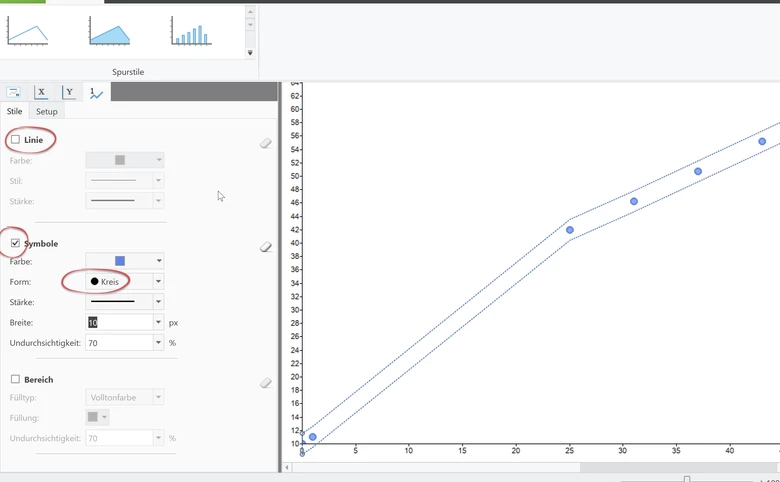
If you want to see just the points and not the connection line, this sure can be done using the Chart component.

Choose the trace, check "Symbol", choose an appropriate symbol (e.g. 'circle' ) and size and uncheck "Line" (or set line width to nothing).

This should do the job:
Werner_E_0-1762748408004.png


Any specific reason you want to use the chart component and not the native plot?

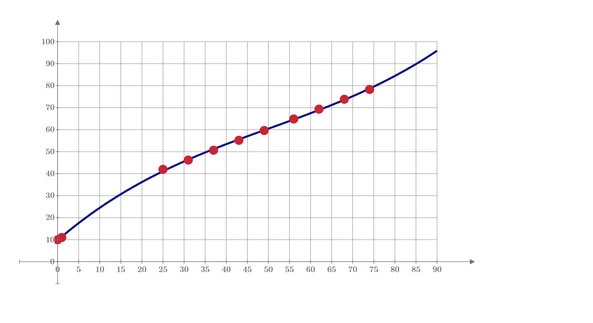
Sure, the native plot provides much less features (like grid lines, secondary y-axis, labels ...) which we are used in 30 + year old real Mathcad, but on the other hand are many drawbacks of the chart component. Its extremely slow reacting, awkward to use, does not work with units (!), does not scale according to the Windows zoom factor set, etc.

But you have decide for your own if you need the additional features and if they are worth using the chart. Personally I prefer the native plot whenever possible.
Werner_E_1-1762749258800.png

BTW, its better to close a thread before asking from anew and leave more threads open.

And if a worksheet requires an Excel data sheet to work you should either attach the Excel sheet as well or hardcode the data in the Prime sheet.


Prime 11 sheet attached


1 reply

Werner_E25-Diamond IAnswer
25-Diamond I
November 10, 2025

What exactly do you mean? Obviously you managed to create a plot.

If you want to see just the points and not the connection line, this sure can be done using the Chart component.

Choose the trace, check "Symbol", choose an appropriate symbol (e.g. 'circle' ) and size and uncheck "Line" (or set line width to nothing).

This should do the job:

Werner_E_0-1762748408004.png


Any specific reason you want to use the chart component and not the native plot?

Sure, the native plot provides much less features (like grid lines, secondary y-axis, labels ...) which we are used in 30 + year old real Mathcad, but on the other hand are many drawbacks of the chart component. Its extremely slow reacting, awkward to use, does not work with units (!), does not scale according to the Windows zoom factor set, etc.

But you have decide for your own if you need the additional features and if they are worth using the chart. Personally I prefer the native plot whenever possible.

Werner_E_1-1762749258800.png

BTW, its better to close a thread before asking from anew and leave more threads open.

And if a worksheet requires an Excel data sheet to work you should either attach the Excel sheet as well or hardcode the data in the Prime sheet.


Prime 11 sheet attached


13-Aquamarine
November 10, 2025

Thank you so much!  This will save me time - initially I was importing my polys into Excel and graphing there (using Excel's scatter plot).  I knew there had to be away to accomplish this in Mathcad - but I just didn't know how.  Again, thanks!