
8-Gravel
March 25, 2025
Solved

PTC Mathcad Express _ Prime 10.0.0.0 _ Percentage Calculation showing wrong reults

  • March 25, 2025
  • 2 replies
  • 876 views

Hello All,


I am attempting to find the percentage deviation of the calculated output.

However, in Mathcad Prime, the calculation using matrix indices is producing incorrect results.

What could be causing this issue?


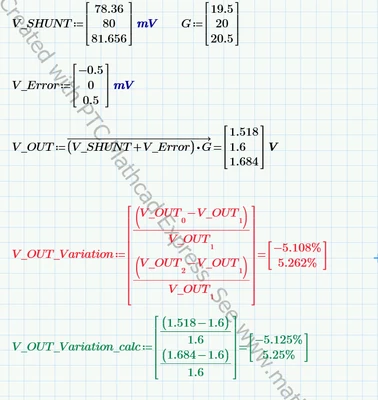
In the attached screenshot, the output calculation in green font is correct and was done manually, while the output calculation in red font is incorrect and was done using the matrix indices formula.
IN_Naga_0-1742886727289.png

I have attached the .mcdx file with my calculations for your reference.

I would greatly appreciate a quick resolution to this problem.


Thanks in Advance.


Best answer by terryhendicott

Capture.JPG

2 replies

21-Topaz II
March 25, 2025
IN_Naga8-GravelAuthor
8-Gravel
March 26, 2025

Thank you for your reply. I got clarification.

25-Diamond I
March 25, 2025

In the attached screenshot, the output calculation in green font is correct and was done manually, while the output calculation in red font is incorrect and was done using the matrix indices formula.

On contrary -  Primes "red font" calculation is the correct one!

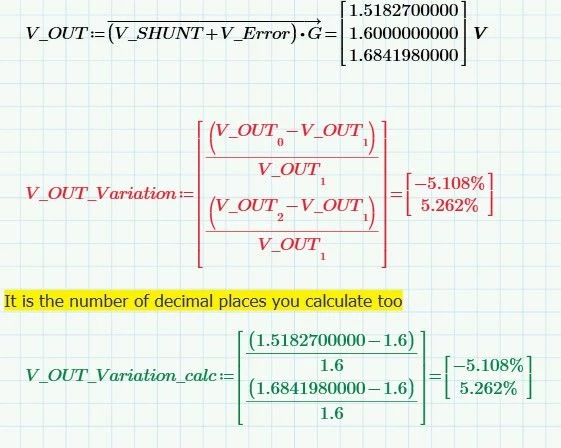
Your manual calculation uses just values rounded to three decimals - hence the difference in the results.

If you use the exact values, the manual calculation agrees with Prime's results:

Werner_E_0-1742888375629.png


By default Prime shows three decimals in results. This can be altered - either for a single result or for all results in the sheet (which have not been formatted manually) depending on where the cursor is placed while you change the setting.

Werner_E_0-1742888631117.png


IN_Naga8-GravelAuthor
8-Gravel
March 26, 2025

Thank you for your reply.