

4-Participant
April 30, 2024
Solved

PTC Mathcad Prime 10.0.0.0 Solve Routine with arrays

  • April 30, 2024
  • 2 replies
  • 2218 views

I was writing up the one of the Mathcad examples for CHAPTER 8: Earth Retaining Structures
8.2 Reinforced Concrete Retaining Walls with Sloping Backhill.


Could you please help me finding why the error massage was showing up?

Best answer by Werner_E

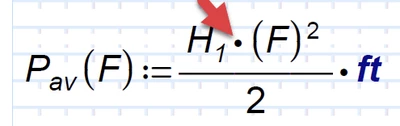
There are two problems in function P.av
Werner_E_1-1714503221784.png


1) You have a multiplication dot between H.1 and the opening parenthesis. But H.1 is a function and should be used with F as its argument (as in the function P.ah right above it


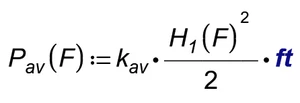
2) After fixing the first problem, P.av return unit "gals" which makes function w.R throw an error because of incompatible units.
I guess you forgot to add the factor k.av when you defined function P.av and it should look like this:
Werner_E_2-1714503408510.png

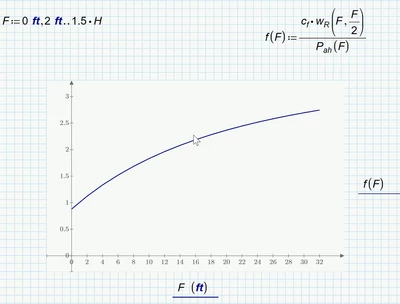
At least using this function definition we get a plot result
Werner_E_3-1714503565995.png

Next problem you sheet shows is a unit mismatch.

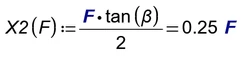
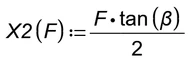
One problem is the definition of function X2(F)
Werner_E_4-1714504279489.png

1) The F on the right hand side is bold blue which means it interpreted as unit Farad!!
2) Never follow a function definition by an evaluation (equal sign =). Doing so here is probably the cause for #1

It should simply look like this:
Werner_E_5-1714504389536.png

There still is a unit mismatch in function M.r!

I played around and tried to fix it and the new version is now unit consistent but I have no idea if my fix makes sense for your application. You'll have to check yourself.

Werner_E_6-1714504524798.png


Now the next unit mismatch in function p.toe, but I got tired poking around so you will have to fix all subsequent unit errors and typos (e.g.:  P.heel instead of p.heel) yourself ...


Prime 10 sheet with some fixes attached

2 replies

23-Emerald IV
April 30, 2024

Not from a .pdf.

You should attach the Prime worksheet (.mcdx) file.


Success!
Luc

Werner_E25-Diamond IAnswer
25-Diamond I
April 30, 2024

There are two problems in function P.av

Werner_E_1-1714503221784.png


1) You have a multiplication dot between H.1 and the opening parenthesis. But H.1 is a function and should be used with F as its argument (as in the function P.ah right above it


2) After fixing the first problem, P.av return unit "gals" which makes function w.R throw an error because of incompatible units.
I guess you forgot to add the factor k.av when you defined function P.av and it should look like this:

Werner_E_2-1714503408510.png

At least using this function definition we get a plot result

Werner_E_3-1714503565995.png

Next problem you sheet shows is a unit mismatch.

One problem is the definition of function X2(F)

Werner_E_4-1714504279489.png

1) The F on the right hand side is bold blue which means it interpreted as unit Farad!!
2) Never follow a function definition by an evaluation (equal sign =). Doing so here is probably the cause for #1

It should simply look like this:

Werner_E_5-1714504389536.png

There still is a unit mismatch in function M.r!

I played around and tried to fix it and the new version is now unit consistent but I have no idea if my fix makes sense for your application. You'll have to check yourself.

Werner_E_6-1714504524798.png


Now the next unit mismatch in function p.toe, but I got tired poking around so you will have to fix all subsequent unit errors and typos (e.g.:  P.heel instead of p.heel) yourself ...


Prime 10 sheet with some fixes attached

4-Participant
April 30, 2024

Thank you so much for your help. I will look into your solution and will try to understand the mistakes.


Regards