

1-Visitor
May 25, 2016
Solved

Quick question; Proper way to define multiple vector values

  • May 25, 2016
  • 9 replies
  • 3485 views

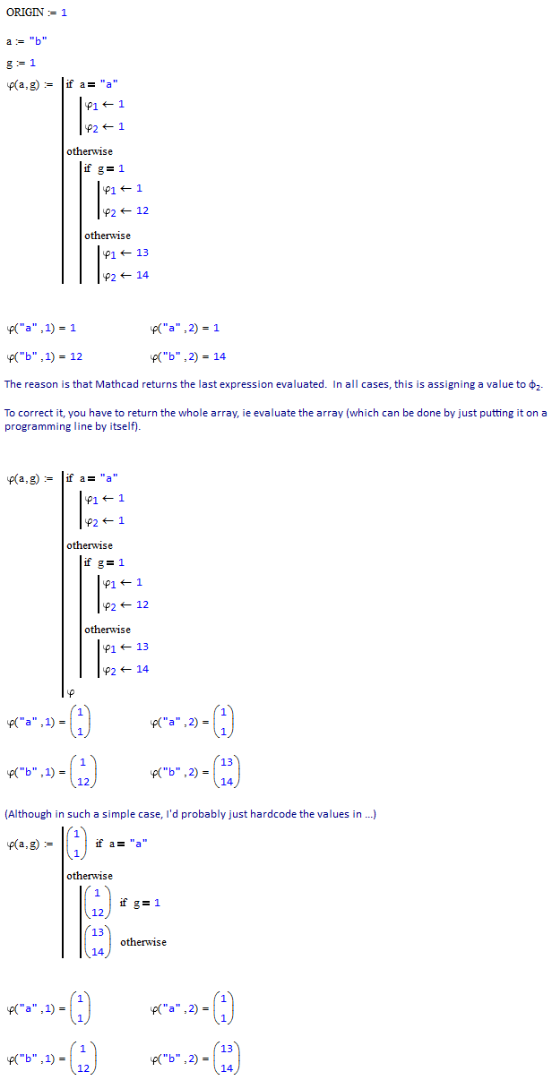
What is the error with the syntax in the attached program? I am attempting to define multiple values of a vector depending on the previously assigned variables. I am expecting the vector to have two rows but only one results.
Best answer by StuartBruff

Daniel Sochor wrote:

What is the error with the syntax in the attached program? I am attempting to define multiple values of a vector depending on the previously assigned variables. I am expecting the vector to have two rows but only one results.

Although the above is in Mathcad 15, the same applies to Prime.

Stuart

9 replies

23-Emerald IV
May 25, 2016

Post your sheet. From the picture it's difficult to see what is an index and what is a literal.

Luc

23-Emerald V
May 25, 2016

Daniel Sochor wrote:

What is the error with the syntax in the attached program? I am attempting to define multiple values of a vector depending on the previously assigned variables. I am expecting the vector to have two rows but only one results.

Although the above is in Mathcad 15, the same applies to Prime.

Stuart

23-Emerald IV
May 25, 2016

Found the culprit. The function delivers the last statement as result.

Add a last statement that returns the desired result,

such as:

23-Emerald I
May 25, 2016

Note that Mathcad usually starts vectors and matrices at index 0

dsochor1-VisitorAuthor
1-Visitor
May 25, 2016

Another quick question (want to avoid creating another topic). Why does Mathcad not see NaN results? In the attached jpeg, c_ac is NaN but the if statement won't recognize it.

23-Emerald IV
May 25, 2016

I guess it's one of those.....Prime things. This is what Mathcad say about it:

Success!

Luc