12-Amethyst
March 18, 2023
Solved

Quickest way to find the row with 2 values in different columns of M (i.e., lookup2(z1, z2, A, B) )

  • March 18, 2023
  • 1 reply
  • 1533 views

I am looking for the most efficient/quickest way to find the row containing two values in different columns of M. The function I am envisioning would be an alteration of 'lookup': lookup2(z1, z2, A, B).

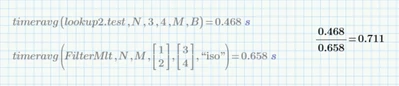
I have tried a few different solutions but was hoping for quicker performance. Using the masking method provided my  @Werner_E  and the efficiency of vectorizing demonstrated by @PEAH , I came up with a decent solution but was only able to cut the processing cost by ~30% when compared to Werner's FilterMlt function he helped me with not too long ago (solid function @Werner_E !). I am planning to use this lookup2 function a couple zillions times in processing data so I was hoping to cut processing time by much more!

I also compared the time to run the built-in lookup function as a baseline which averaged ~0.15s @ N=10^5. I figure, looking up two values shouldn't be much more than one, max 2x 0.15 = 0.3s, but I am not able to achieve that.


MCP worksheet with parts of @Werner_E  and @PEAH's work attached. My comparisons on pgs. 3 and 4.
Andy_C_0-1679168737970.png

MCP 8.0, Windows 10 Pro


Best answer by Werner_E

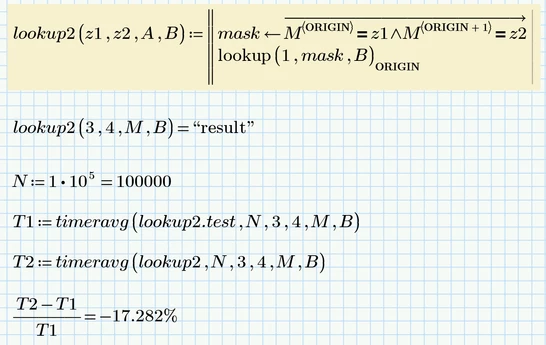
Here is a shorter and slightly faster variant.

However, it should be noted that the timing may be entirely different when significantly larger matrices and vectors are involved.

Werner_E_0-1679179371255.png


1 reply

Werner_E25-Diamond IAnswer
25-Diamond I
March 18, 2023

Here is a shorter and slightly faster variant.

However, it should be noted that the timing may be entirely different when significantly larger matrices and vectors are involved.

Werner_E_0-1679179371255.png


Andy_C12-AmethystAuthor
12-Amethyst
March 19, 2023

Thank you @Werner_E !! I was so close, haha. So simple: use AND.


So far, with my big data sets I've seen time savings of around 20-25% which is good! In the test sheet, I saw improvements from 28% (vs lookup2.test) to 65% (vs FilterMlt)!! lookup2 is still slower than lookup, but I think we've maxed out this custom functions ability.


Thanks again!

25-Diamond I
March 19, 2023

You may try to turn the function into a one-liner by omitting the local variable "mask" and putting the vectorized expression directly in the lookup function. Maybe you can speedup the calculation by a few % that way - not sure, though.