12-Amethyst
February 16, 2022
Solved

Range return value

  • February 16, 2022
  • 1 reply
  • 1338 views

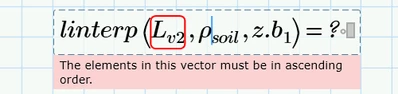
Hi guys Im getting this error below when looking at range of values in a table and trying to match the relevant density.
 

BG_9641770_0-1645031642239.png

 Sheet is attached, thanks guys 


🙂

Best answer by LucMeekes

The error message is clear: linterp requires that the first argument is a vector with values in ascending order. Your vector Lv2 has values 1, 2, 4, 7, 0 and 0.

The first four values are ascending (every next value is higher than the previous), but the fifth and sixth are 0, that is less than 7.

Considering you have empty or zero values in that part of the table that you draw Lv2 from, I suggest you cut the bottom two lines (for layers 5 and 6) from the table. Then it should work.

Note that the result of the function is not 18, but 17.41 kg/m^3, because, contrary to its name, linterp also extrapolates linearly.


Success!
Luc

1 reply

LucMeekes23-Emerald IVAnswer
23-Emerald IV
February 16, 2022

The error message is clear: linterp requires that the first argument is a vector with values in ascending order. Your vector Lv2 has values 1, 2, 4, 7, 0 and 0.

The first four values are ascending (every next value is higher than the previous), but the fifth and sixth are 0, that is less than 7.

Considering you have empty or zero values in that part of the table that you draw Lv2 from, I suggest you cut the bottom two lines (for layers 5 and 6) from the table. Then it should work.

Note that the result of the function is not 18, but 17.41 kg/m^3, because, contrary to its name, linterp also extrapolates linearly.


Success!
Luc

12-Amethyst
February 16, 2022

Thanks Luc thats spot on, yes changed the values in the table and it returned 17.41 kg/m^3.


Yes correct Luc, i have swapped the Interp out to get


BG_9641770_0-1645044429867.png
