
1-Visitor
December 11, 2015
Solved

Range Variable and My Sanity

  • December 11, 2015
  • 8 replies
  • 3798 views

Using MathCAD 15 in Windows 7. Based on this quote from the help file regarding range variable creation:

b is optional, but when used, it represents the value of a plus the step size to be used in generating the sequence of numbers

I am puzzled by the values created by these two range statements:
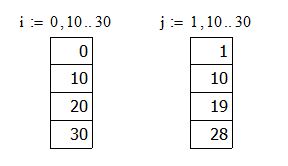
Capture.JPG

I understand the values for range variable i, but I thought j values would be 1, 11, 21. It appears as if MathCAD is calculating the step size as the difference between a and b versus using b as the step size. Am I confused or is the help file incorrect?

Best answer by LucMeekes

As Fred already pointed out: it's correct.

The wording is (mathematically) correct.

b= a+ Step. So if a= 1 and b= 10 then Step= 9 (because b- a= 10- 1= 9).

Success!
Luc

8 replies

23-Emerald I
December 11, 2015

I can't find your quote in my version 15 help--no discussion about a or b.  But the first term in the definition is the starting value, if there's a second term it's the second value in the sequence.  You quote above  translates to "b = a + step", not "b = step" which is what 1, 11, 21 would require.  ( to get that you need

"j:= 1,11 .. 30)

1-Visitor
December 11, 2015

Capture.JPG

LucMeekes23-Emerald IVAnswer
23-Emerald IV
December 11, 2015

As Fred already pointed out: it's correct.

The wording is (mathematically) correct.

b= a+ Step. So if a= 1 and b= 10 then Step= 9 (because b- a= 10- 1= 9).

Success!
Luc