6-Contributor
October 28, 2021
Solved

Range Variable Evaluation results in Error at Other Equations

  • October 28, 2021
  • 2 replies
  • 4084 views

I am using Mathcad Prime 7.0 7.0.0.0

Range Variable Evaluation results in Error at Other Equations

Here are the errors that I faced
"This variable must be an integer".

A range variable is used to evaluate other equations.
When the range variable is evaluated, the other equations do not evaluate, for reason that "This variable must be an integer".
When the range variable is NOT evaluated, the other equations evaluate, as expected.

See attached screen shots of equations, one shows the variable evaluated, the other not evaluated.  By request, sample worksheet added. 

Question: What am I not understanding about the evaluation, or the NOT evaluation of the range variable?
AND
Another question might ask if the variable can be evaluated as an integer so that subsequent equations will still evaluate.

Thanks.

MGM
Best answer by terryhendicott

Hi Michael,

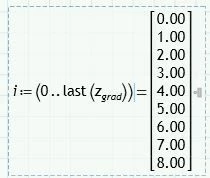
The problem is an equal sign after the definition of the range variable "i".

An undocumented feature of Prime is that if you define a range variable then use an equal sign in the definition it turns the range variable into a vector.

This is a problem if you then use the now defined vector to index a position in a vector.

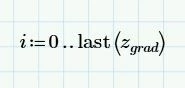
Capture.JPG is OK as i is a range variable.

Capture2.JPG is not OK as i is now a vector not a range variable.


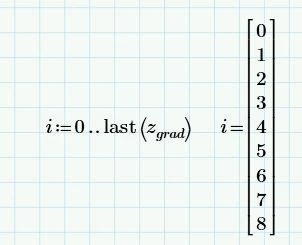
If you want to see the value of the range variable on creation do this

Capture3.JPG

Cheers

Terry


2 replies

24-Ruby III
October 28, 2021

Please attach your Mathcad Prime worksheet.

6-Contributor
October 28, 2021

Vladimir:  Added.  Thanks. 

21-Topaz II
October 28, 2021

Hi Michael,

The problem is an equal sign after the definition of the range variable "i".

An undocumented feature of Prime is that if you define a range variable then use an equal sign in the definition it turns the range variable into a vector.

This is a problem if you then use the now defined vector to index a position in a vector.

Capture.JPG is OK as i is a range variable.

Capture2.JPG is not OK as i is now a vector not a range variable.


If you want to see the value of the range variable on creation do this

Capture3.JPG

Cheers

Terry


6-Contributor
October 28, 2021

Terry,

Outstanding!  If I could give you 2 kudos, I would.  

I vaguely remember reading the condition and effect that you described, but I could not find it to check on myself.  

I'm now wondering if there is a means to undo the vector effect? 

As a test, I added the equal sign to the range variable and it presented the vector.  I then copied the the range variable down below, but without the equal sign.  With the restatement of the range variable i, equation for Kz evaluates as expected. 


See the following and note that the range variable is vectorized with an "=" sign, thus the equation for Kz doesn't work, as previously shown. 

Capture - Range Variable Evaluated & Restated.PNG  Next, the range variable is restated, and without the "=". 

Thus, equation for Kz is evaluated as shown here.  

Is there another way to undo or cancel the vector effect? 

Thanks. 

MGM 

25-Diamond I
October 29, 2021

You mean a way to transform a vector into a range? No, none that I would be aware of and you would also run into problems if the vector elements are not equally spaced.

But why would you like to do so? Simply don't use the inline evaluation after the definition of the range.

If your goal is to display the range for whatever reason, simply define it and in an extra region beside evaluate it (see below).


Note that Prime (unfortunately) displays a range the very same way as a vector which sure adds to the confusion.

Werner_E_0-1635500806174.png


BTW, as can also be read here in the forum now an then, inline evaluations can cause unexpected problems sometimes. So its a good behaviour to avoid them to be on the safe side.

Rather than writing

Werner_E_1-1635501140090.png

you would write

Werner_E_2-1635501182449.png