
1-Visitor
December 18, 2015
Solved

Range Variables in User Defined Functions

  • December 18, 2015
  • 6 replies
  • 4546 views

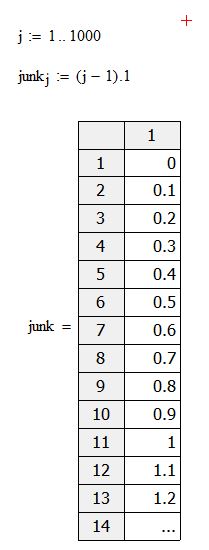
I'm using MathCAD 15 in Windows 7 environment. I'm trying to create a vector using a range variable or at least that's what I think I'm doing. I thought I could set up a similar command sequence in user defined function as below:
Capture.JPG

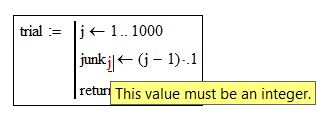
But as you can see in my user defined function, MathCAD is not happy with me or range variables don't work the same way in a user defined function as they do in the regular environment.
Capture.JPG

Best answer by StuartBruff

StuartBruff wrote:

Andy Stevenson wrote:

I'm using MathCAD 15 in Windows 7 environment. I'm trying to create a vector using a range variable or at least that's what I think I'm doing. I thought I could set up a similar command sequence in user defined function as below:

But as you can see in my user defined function, MathCAD is not happy with me or range variables don't work the same way in a user defined function as they do in the regular environment.
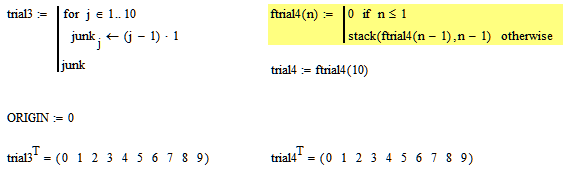
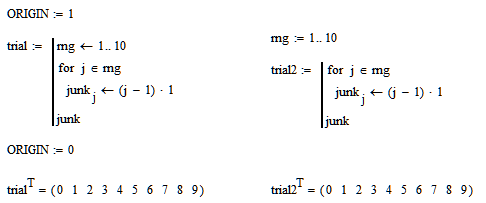
Just to emphasize the point Luc is making, you cannot use range variables inside a loop in the way you want (and as seems reasonable).  You have to use a for or while loop instead.   You can still define a range variable to use, either inside a program or externally, but you have to handle them differently.

Oops, pressed a button too soon.  I forgot to add an example of the normal use of a for loop and a non-looping recursive method.

Stuart

6 replies

23-Emerald IV
December 18, 2015

First off, the default start index for a vector is set by ORIGIN, which normally is 0. Apparently you've set it to 1 otherwise junk[0 would have been shown.

To create a vector in a program do:

This one is independent of the value of ORIGIN.

Success!
Luc

23-Emerald V
December 18, 2015

Andy Stevenson wrote:

I'm using MathCAD 15 in Windows 7 environment. I'm trying to create a vector using a range variable or at least that's what I think I'm doing. I thought I could set up a similar command sequence in user defined function as below:

Capture.JPG

But as you can see in my user defined function, MathCAD is not happy with me or range variables don't work the same way in a user defined function as they do in the regular environment.

Capture.JPG

Just to emphasize the point Luc is making, you cannot use range variables inside a loop in the way you want (and as seems reasonable).  You have to use a for or while loop instead.   You can still define a range variable to use, either inside a program or externally, but you have to handle them differently.

Stuart

23-Emerald V
December 18, 2015

StuartBruff wrote:

Andy Stevenson wrote:

I'm using MathCAD 15 in Windows 7 environment. I'm trying to create a vector using a range variable or at least that's what I think I'm doing. I thought I could set up a similar command sequence in user defined function as below:

But as you can see in my user defined function, MathCAD is not happy with me or range variables don't work the same way in a user defined function as they do in the regular environment.

Just to emphasize the point Luc is making, you cannot use range variables inside a loop in the way you want (and as seems reasonable).  You have to use a for or while loop instead.   You can still define a range variable to use, either inside a program or externally, but you have to handle them differently.

Oops, pressed a button too soon.  I forgot to add an example of the normal use of a for loop and a non-looping recursive method.

Stuart

1-Visitor
December 18, 2015

Thanks Guys. I knew had to get around it with just writing a brute force "for loop" in my user defined function. Just found it odd that the range variable method doesn't work inside a user defined function.