
14-Alexandrite
September 5, 2024
Solved

Read input from pdf or text note

  • September 5, 2024
  • 1 reply
  • 1475 views

I need to input data from Notepad . Can mathcad do that ? using ReadText function or there is another way to do it ? 

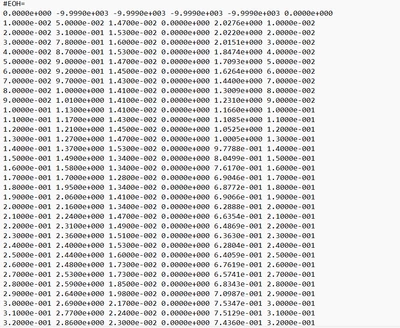
This is the data I need to input , I couldn't attach the note file because the file type is not supported , so I attached as pdf
YA_10963798_0-1725553816928.png

YA_10963798_1-1725557284578.png


Best answer by LucMeekes

Yes, Prime can do that.


Look up the function READTEXT in the help of Prime.

Here's an example, based off the pdf file (and starting with the line containing #EOH= ) :

LucMeekes_0-1725558552631.png

Results in:

LucMeekes_1-1725558620214.png

etc.


Success!
Luc


1 reply

LucMeekes23-Emerald IVAnswer
23-Emerald IV
September 5, 2024

Yes, Prime can do that.


Look up the function READTEXT in the help of Prime.

Here's an example, based off the pdf file (and starting with the line containing #EOH= ) :

LucMeekes_0-1725558552631.png

Results in:

LucMeekes_1-1725558620214.png

etc.


Success!
Luc


14-Alexandrite
September 5, 2024

what does '' delimited'' do?


And  should I write my file name instead of '' File'' ?


Thanks 

DJNewman
18-Opal
September 5, 2024

As Luc said, look up READTEXT in Help: https://support.ptc.com/help/mathcad/r10.0/en/#page/PTC_Mathcad_Help/text_files.html


You'd write your file name in quotes.

Delimited says how the data is structured in the file (how Mathcad is supposed to know when a new column begins and the old one ends). In the case of his example, a space (" ") is the delimiter.

PTC Marketer for Creo and Mathcad. I run their YouTube channels, some Creo campaigns, and all Mathcad campaigns and communications.

