12-Amethyst
June 20, 2023
Solved

READCSV is having funny behaviour inside a program

  • June 20, 2023
  • 1 reply
  • 1487 views

Good morning,


I spun my wheels on this for a while yesterday, and now I'm looking for help. The attached file was created in MathCAD Prime 8.0. In order for it to work, make sure that the csv file and the mathcad file are in the same directory. What it's supposed to do is accept a csv file with a specific structure and convert it into a vector of properties with MathCAD units. It was supposed to be a short program, but I'm running into a bug that I can't seem to work around gracefully. 


When I have the READCSV(filename) function inside of a program, my output has no units, but when I have my READCSV function outside of the program, it works. 


I want the READCSV function to work inside of the program so that I can call multiple csv files and combine the properties of each, otherwise the purpose of my overly-complicated data entry experiment is moot. Please help! 


Thank you,

Kevin

Best answer by Werner_E

Thats a strange bug and its still present in Prime 9.

You may consider reporting it to PTC support.


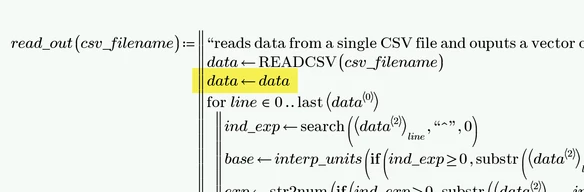
In the meanwhile the highlighted reassignment   data<--data   does the trick (don't ask me why!)

Werner_E_0-1687282745488.png

You can save one line by using kind of a double assignment

Werner_E_1-1687282872755.png


EDIT: Yet another workaround and maybe the most desirable, as its not necessary to change any programs already present.

Simply redefine the built-in function READCSV( ) at the top of the sheet (maybe in a collapsed region) as shown below

Werner_E_0-1687283463263.png


1 reply

Werner_E25-Diamond IAnswer
25-Diamond I
June 20, 2023

Thats a strange bug and its still present in Prime 9.

You may consider reporting it to PTC support.


In the meanwhile the highlighted reassignment   data<--data   does the trick (don't ask me why!)

Werner_E_0-1687282745488.png

You can save one line by using kind of a double assignment

Werner_E_1-1687282872755.png


EDIT: Yet another workaround and maybe the most desirable, as its not necessary to change any programs already present.

Simply redefine the built-in function READCSV( ) at the top of the sheet (maybe in a collapsed region) as shown below

Werner_E_0-1687283463263.png


12-Amethyst
June 20, 2023

Thank you! This is the solution I needed!