
12-Amethyst
March 18, 2021
Solved

READEXCEL

  • March 18, 2021
  • 1 reply
  • 5686 views

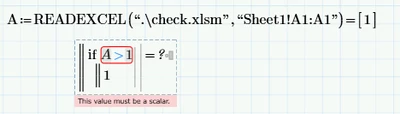
Hi all I am using the readexcel function in mathcad prime 6.0.0.0 and to even read in a number it comes in as not a scaler. is there a set format in excel that i am missing as you can see the number below comes in in brackets [1] as an example. I have tried both .xlsx and .xlsm file types both give me the same. 


note: the if function below is just an example to show I cant use the data brought in because of the [1] (brackets). 
 

BG_9641770_0-1616059781592.png

Thanks
Ben

Best answer by LucMeekes

You should (ALWAYS) attach THE worksheet, or at least A worksheet, that demonstrates the problem.

Anyway, I can see that you DID NOT type the opening square bracket before ORIGIN. It isn't there for nothing.

This is what you should get,

LucMeekes_0-1616072087147.png

and attached Prime file has the expression as well.


ORIGIN is not a function, but a Mathcad/Prime system variable that defines the origin of indexing in matrices and vectors (arrays). By default it is set to 0 (meaning that the first element of vector V is V0, but it can be set to any value (in real Mathcad ) or to 0 or 1 (in Prime).


Success!
Luc

1 reply

23-Emerald IV
March 18, 2021

(Apparently) READEXCEL reads in the data from the excel file as an array (or a 'vector' if you will). If you only read in a single number, it will be a on-element vector in Prime. That's what the square brackets indicate.

If you take the first element of that vector, you have your number.

If you type

[ORIGIN

At the end of calling the READEXCEL function, so immediatley after the closing bracket ) and before the  =

that should do it.


Alternatively you can take the element in your little program, by adding the [ORIGIN to the variable A.

Note that if you have a vector, you cannot compare it to a scalar (=single number).


Success!
Luc

12-Amethyst
March 18, 2021

Thanks Luc 

it hasn't appeared to work, still getting the [1]


BG_9641770_0-1616063805615.png


12-Amethyst
March 18, 2021

Doesn't work outside the bracket either 


BG_9641770_0-1616064142113.png
