

1-Visitor
November 9, 2016
Solved

READPRN() fails in 045 but works in 010

  • November 9, 2016
  • 13 replies
  • 4749 views

I have a work sheet I use and it runs properly on a Windows 7 machine in Mathcad 010 but it fails to work in Mathcad 045 working on a Windows Surface book OS 10.

the command is
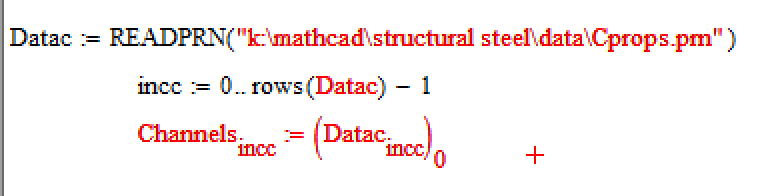
Any ideas?

Is this a problem in OS or changes to MathCAD from 010 to 045?

A
Best answer by albertschepers

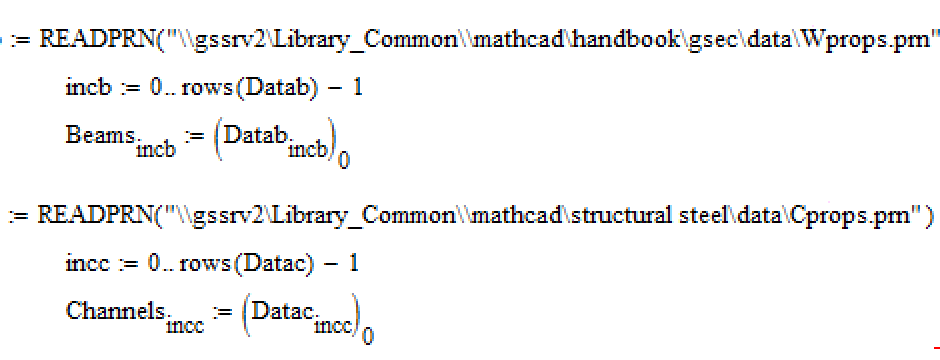
I did run the original worksheet using the direct reference and it does now work.

I suspect that the issue is Windows 10 which will hopefully get fixed in the upcoming release.  In the mean time I will need to rewrite my functions:

Thanks for your assistance.

A

13 replies

23-Emerald IV
November 9, 2016

What is the error message (the text in the yellow box that appears when you click your cursor in the first offending statement)?

I suspect that your windows 7 machine has access to your drive k:, while the OS 10 surface book hasn't.

Success!

Luc

1-Visitor
November 9, 2016

The error is "can't open data file"

The drive is mapped correctly on both computers.

A

23-Emerald V
November 9, 2016

I can read a local prn file (from an older version of Mathcad) on my M045.

Stuart

24-Ruby IV
November 10, 2016

But can you open this ".prn" file from your Desktop?

1-Visitor
November 10, 2016

I edited my response as I thought I would try some other things as well.  See the screen image there.

Basically MathCAD does not like the mapped drive reference.  It can read and write to the direct network loaction though.

I suspect, more and more, that it is a windows 10 thing.  I will rewrite the references in my worksheet to the server  rather than a mapped drive to see what happens.

A