
1-Visitor
February 12, 2015
Question

Recovery from "Unhandled Exception"

  • February 12, 2015
  • 2 replies
  • 1739 views

I have been away from MathCad for a while (problem with renewal and obtaining license file -- took many months to straighten out), but I'm getting back up to speed again.

I've been using MathCad for >20 years (many versions!!). I was working on a new Worksheet and I got the following Message box:2015-02-12_14-16-03.png
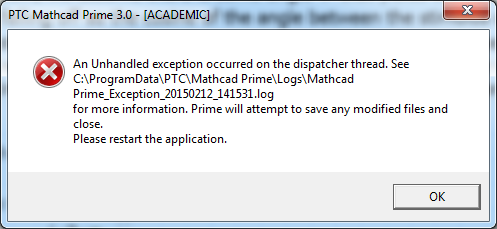
If I open the "saved" file, I get the same error message. Is there a way to "open safely" so that I can at least print out what I was doing, and figure out which step led to this crash (so I don't do it again)? Or am I just "out of luck" and will have to start all over generating the several pages of test and code that I was developing?

Bob Schor

2 replies

25-Diamond I
February 12, 2015

Searching this forum brings up two threads with a similar Prime problem.

http://communities.ptc.com/message/179339#179339

and

http://communities.ptc.com/message/266510#266510

so at least you know you are not alone.

The second question remained unanswered and I am not sure if the solution in the first one would apply in your case as your windows version probably is set to English anyway.

If I understood correctly the other posters were not able to use Prime any longer while in your case only one file is concerned.

Guess the best solution would be to contact PTC technical support.

24-Ruby III
February 16, 2015

1. Try to reinstall Mathcad Prime 3.0.

2. Send your request via the "Academic Support Request" form: Academic Support Request | PTC Academic Program | PTC