1-Visitor
May 19, 2022
Solved

Reduce a solution equation (with symbolic)

  • May 19, 2022
  • 3 replies
  • 4721 views

Hello

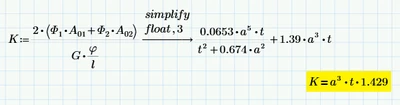
I use MathCad Prime 7.0, to a lot of symbolic solutions, but many times it comes out in a long solution that could be reduced, but simplify can not do it. What should I use to make it shorter/reduced.

KJ_6576822_0-1652962462087.pngKJ_6576822_1-1652962538969.png


Best answer by MSheykman

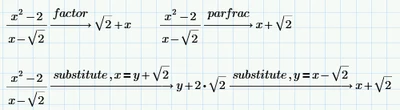
Here are some options to get the desired result: 

MSheykman_0-1653469780708.png

But please also consider: 

MSheykman_1-1653469896873.png


3 replies

24-Ruby III
May 19, 2022

 Hi,


Please upload your Mathcad Prime worksheet here.

1-Visitor
May 19, 2022

I have uploaded it now 😄 

25-Diamond I
May 19, 2022

@KJ_6576822 wrote:

Hello

I use MathCad Prime 7.0, to a lot of symbolic solutions, but many times it comes out in a long solution that could be reduced, but simplify can not do it. What should I use to make it shorter/reduced.


If you have great need for symbolic computation, you might consider using software that is significantly more powerful than Prime in this area - e.g. Maple or Mathematica.
Mathcad in version 11 still had Maple implemented as a symbolic core, but after that the quality of symbolic unfortunately went downhill. First Maple was replaced by muPad and since Prime 6 the new symbolic core is an offshoot of Axiom and with each change also quality losses went along.


In Prime you could additionally or alternatively of course try the usual modifiers like "factor" or "expand" and sometimes it also helps to tell the program by means of "assume" that this or that variable (or ALL) is only real or greater than zero, etc.. You may also try "symplify,max" instead of just "simplify". But there is no guarantee that the desired simple result will come out.
In your first pic you may try to multiply the  inverse of the matrix on th eLHS with the A-vector and see if the result simplifies better
In you second pic I don't see why the result should be equal to the one you write in the lower left. Keep in mind that using "float" does not only affect the display of the result but also the precision of the whole calculation. So float should be used just with great care.
As VladimirN already wrote, it can be helpful to post the worksheet, so that other participants here can play around with it a bit and maybe find a solution.


1-Visitor
May 19, 2022

I have uploaded til worksheet

Thanks for the ones I could try out, some work i some places and other does not 🙂 

25-Diamond I
May 19, 2022

Here is what my first suggestion delivers:

Werner_E_0-1652969908661.png

I am not sure if/why you think it could be made much simpler (apart from expanding the expression in the root to b^2 - h^2).

I also don't see why the expression for K should be much simpler and the expression in the worksheet you posted shows a significantly different result than the one in your screenshot.

At the end of the sheet you are assigning values to some variables so I wonder why you don't provide them from the very beginning if all you are looking for are numeric results anyway.

Another way would be to turn your calculated variables into functions of the input variables. This won't make the symbolic results nicer but you can hide all of them in collapsed regions and simply evaluate the functions created with the numbers you like.


1-Visitor
May 19, 2022

Here is a worksheet, with the problem

25-Diamond I
May 19, 2022

You can't expect exact results if you use "float"

And I doubt that K=a^3*t*1.429, it just might be a good approximation

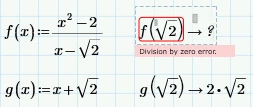
Werner_E_0-1652996637065.png

Furthermore I already wrote that the quality of the symbolic result got worse with each change of the engine.

Here is an example (in Prime 6 we can chose between the legacy and the new engine)

Werner_E_1-1652996822833.png


MSheykman5-Regular MemberAnswer
5-Regular Member
May 25, 2022

Here are some options to get the desired result: 

MSheykman_0-1653469780708.png

But please also consider: 

MSheykman_1-1653469896873.png