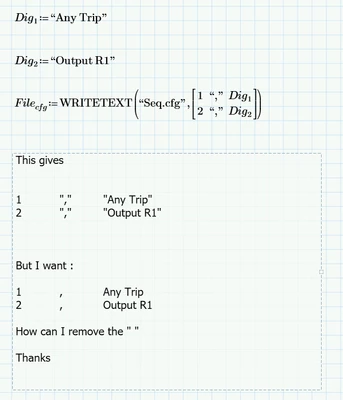
Best answer by Werner_E

@terryhendicott wrote:

Hi,

WRITEPRN in Mathcad 15 used to do exactly that but for unknown reasons they changed it for Prime?


WRITEPRN is still available in Prime and works the same way as in MC15 - it does not remove the quote character either and additionally adds some header information at the top.

WRITETEXT is new in Prime and should have been implemented in a way so that at least you have a choice to remove the quotes.

It was a long standing wish for Mathcad to be able to create true text files in an easy and intuitive way but the only way to accomplish that was using the WRITEBIN function.


Here is a brute force workaround - a user defined function WRITETXT2() which uses WRITETXT to write the file, reads it in again via READBIN, removes all quote character (#34) and rewrites the file via WRITEBIN.

Should work well as long as the strings don't contain quote characters themselves!
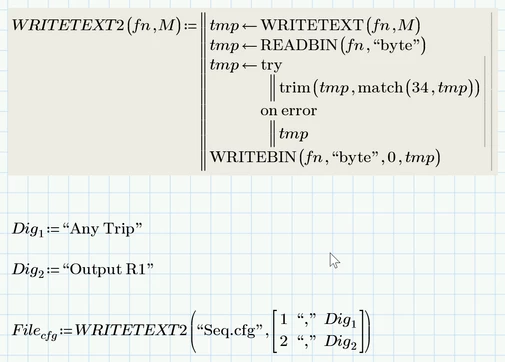
Werner_E_0-1682664619512.png


3 replies

21-Topaz II
April 28, 2023

Hi,

WRITEPRN in Mathcad 15 used to do exactly that but for unknown reasons they changed it for Prime?


Here is a workaround that does what Mathcad 15 used to produce.  It creates a binary file which is nothing but a collection of bytes that can be read by an editor like Notepad.  It creates an extra line at the top but you can delete this in the text editor.  It generates spaces (character 32) between the items but could be adjusted to do tabs (character 9) in between if required.


Capture.JPG


Capture2.JPG

Cheers

Terry


Werner_E25-Diamond IAnswer
25-Diamond I
April 28, 2023

@terryhendicott wrote:

Hi,

WRITEPRN in Mathcad 15 used to do exactly that but for unknown reasons they changed it for Prime?


WRITEPRN is still available in Prime and works the same way as in MC15 - it does not remove the quote character either and additionally adds some header information at the top.

WRITETEXT is new in Prime and should have been implemented in a way so that at least you have a choice to remove the quotes.

It was a long standing wish for Mathcad to be able to create true text files in an easy and intuitive way but the only way to accomplish that was using the WRITEBIN function.


Here is a brute force workaround - a user defined function WRITETXT2() which uses WRITETXT to write the file, reads it in again via READBIN, removes all quote character (#34) and rewrites the file via WRITEBIN.

Should work well as long as the strings don't contain quote characters themselves!

Werner_E_0-1682664619512.png


21-Topaz II
April 28, 2023

@terryhendicott wrote:
Hi,

WRITEPRN in Mathcad 15 used to do exactly that but for unknown reasons they changed it for Prime?


What I meant to say is a data export wizard existed in Mathcad 15 that outputted a formatted text file in PRN format from a matrix.

numbers remained numbers, single quoted text was written as text without quotes, double quoted text was written as single quoted text.


I miss this utility in Prime.


Capture.JPG

Capture2.JPG

Capture4.jpg

Cheers

Terry

21-Topaz II
April 28, 2023

Hi,

You could also just use a text editor and replace " with nothing.

Cheers

Terry

16-Pearl
April 30, 2023

There was a sample worksheet some time ago for converting Mathcad matrices to C++ code. They ran into the same problem with the double quotes and wrote a cool function that converts the matrix strings to binary vectors (using the string to vector function, str2vec) to encode everything as binary arrays and then write the arrays to a file using WRITEBIN(), which writes binary to a file with no formatting (like adding the double quotes).


Here's the User Function (slightly modified from the original) to output the matrix to a text file with no double quotes:

JeffH1_0-1682874927224.png


Use the function as follows:

JeffH1_1-1682874987796.png

I've attached an update to your sequencer worksheet here that demonstrates this function (in Prime 9 format, since that's what you uploaded).