

12-Amethyst
April 30, 2015
Solved

Removing red flags in Prime 3?

  • April 30, 2015
  • 1 reply
  • 1500 views

All -- I am a very, very infrequent user of Prime -- I have stuck to MC 15 and, increasingly, MATLAB. However, I just needed to port an old sheet to Prime 3. After the conversion, I see several warnings (see below). How can I get rid of these things? Thanks!
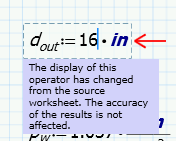

Clipboard01.png Capture.PNG

Best answer by LucMeekes

That information should be in the "Migration guide" that came with your installation.

In short "

After you edit all the annotated regions, on the Input/Output tab, in the PTC

Mathcad Worksheets group, click Clear Annotations. The annotation marks

disappear.

"

Success!
Luc

1 reply

LucMeekes23-Emerald IVAnswer
23-Emerald IV
April 30, 2015

That information should be in the "Migration guide" that came with your installation.

In short "

After you edit all the annotated regions, on the Input/Output tab, in the PTC

Mathcad Worksheets group, click Clear Annotations. The annotation marks

disappear.

"

Success!
Luc

12-Amethyst
April 30, 2015

Ahhh..."Clear Annotations" on the "Input/Output" tab. Thanks a bunch.

That said, am I the only one to whom this seems very non-obvious? Why would this be on the input/output tab?