14-Alexandrite
October 2, 2024
Solved

Repeating the values

  • October 2, 2024
  • 3 replies
  • 3253 views

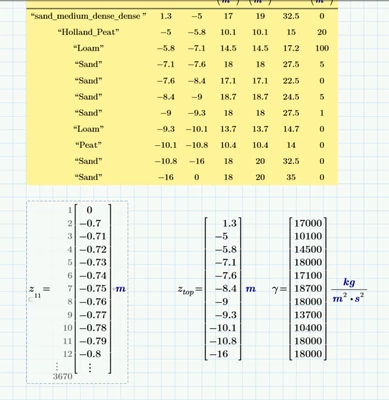
I have two vectors .. ztop and z 

ztop shows the depth of each layer (cumulative value of z in each layer) . ztop  has 11 values

z shows points in that depth .. it approximately increases by 0.02 in each layer. ( it has 3670 values)


each layer has its gamma and its ztop .. ( both have 11 values)

what I need is to write a program that will repeat gamma values for each z 

so I get the 3670 gamma values . 

In the first layer instead of having one gamma( 17 kN/m3) one value for all the layer , I need to get a vector which repeat this gamma as many as z in this particular layer .. and do the same for the rest layers.
YA_10963798_0-1727850998631.png


Can you help me with that?


Best answer by terryhendicott

Hi,

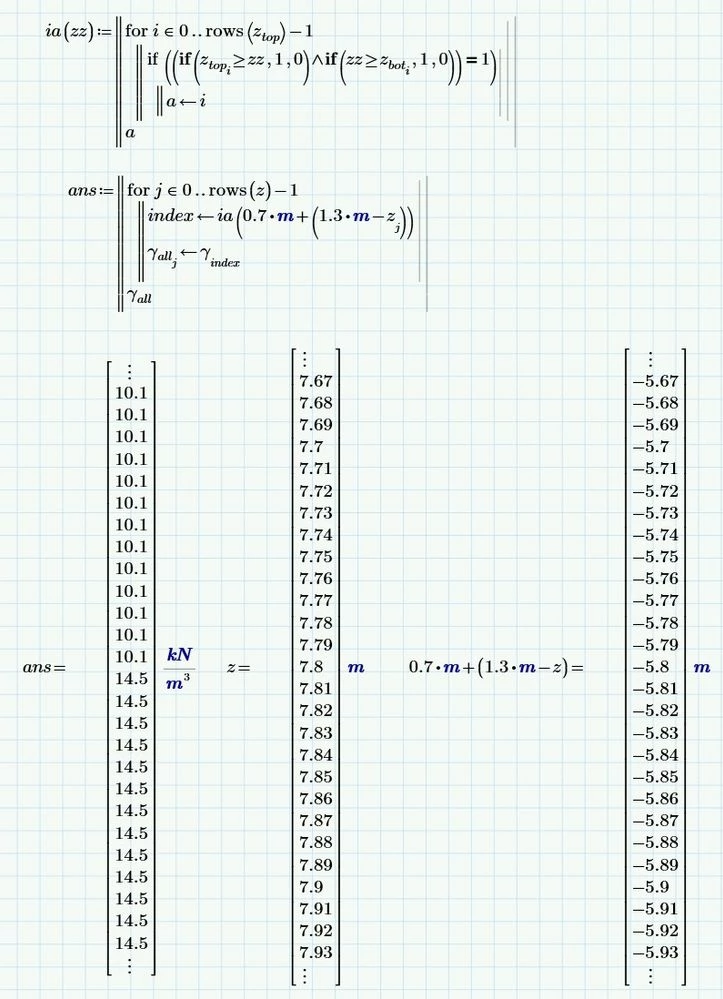
Do you mean like this?

Capture.JPG

3 replies

19-Tanzanite
October 2, 2024

Do you mean something like this?

layers.png

But why would you need to do that?  I've probably misunderstood what you need!


Alan

14-Alexandrite
October 2, 2024
Well, I need to do that to satisfy the European code reiquirements. hhhhhh if it was for me I don't want to do it at all

19-Tanzanite
October 2, 2024

@YA_10963798 wrote:
Well, I need to do that to satisfy the European code reiquirements. hhhhhh if it was for me I don't want to do it at all


What I mean is why not just use the scalar values in the calculations at each level without constructing a large vector of repeated values?  It seems incredibly inefficient!!   

25-Diamond I
October 2, 2024

shows points in that depth .. it approximately increases by 0.02 in each layer. ( it has 3670 values)

No, z has only 3669 values and the increment is not approx. 0.02 but exactly 0.01 m !

Hope you have not typed in all those values manually but rather copied them from an Excel sheet 🙂


So you want to use the exact gamma value for the layer and do not want gamma to be interpolated?

So maybe this could help:

Werner_E_0-1727860766635.png


BTW, it would be much easier to create the vector z either using a range and convert it to a vector or create the vector directly using a small program.

Werner_E_1-1727860041382.png


You may also use a worksheet range variable instead of the program with the for-loop, but I would prefer the programmed variant

Werner_E_2-1727860216316.png

BTW, even though you did in previous threads, you should always state which version of Prime you are using if its not the latest. You can avoid that way to be sent a file you can't open.

21-Topaz II
October 2, 2024

Hi,

Do you mean like this?

Capture.JPG

25-Diamond I
October 2, 2024

@terryhendicott 

Is there any special reason why you don't simply use

Werner_E_0-1727864673822.png

Maybe additionally adding a "break" after the assignment for increased efficiency.


How did you manage to scroll all three vectors to the very same position?

I never succeed doing so as those silly sliders are much to inaccurate and as far as I have seen its not possible to use the keyboard.

23-Emerald V
October 4, 2024

Here's another way to solve your problem.  Using local functions may help with future problems of this nature.


2024 10 04 A.png


2024 10 04 B.png


Stuart


The worksheet is in Mathcad Prime 10 format, I'm afraid, not MP9.