1-Visitor
April 13, 2016
Solved

Replacing values of built-in constants causes problems

  • April 13, 2016
  • 4 replies
  • 2011 views

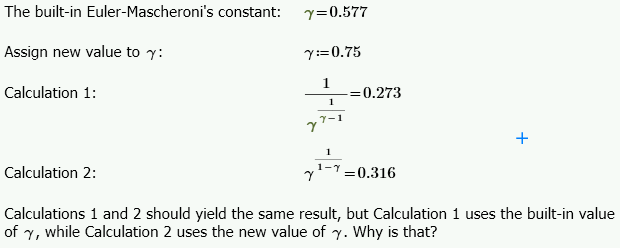
Capture.PNG

Best answer by Werner_E

Ah!

I think I spotted it.

You are using Prime and the problem occurs because of Primes (auto) labeling "feature" - a major annoyance.

If you look closely you see, that the gamma in first and third expression is colored gray - this means its labeled as (built-in) constant.

The gamma in the second and fourth expression is colored black, so I guess its either labeled as variable or as "automatic" ( - ).

So you are working with two different gammas with different values.

Label manually accordingly to get the results you expected.

In Norms screenshot all gamma apart from the first are black, using the newly defined variable.

WE


4 replies

1-Visitor
April 13, 2016

I didn't see that using Prime 3.1:

25-Diamond I
April 13, 2016

Which version of Mathcad are you using?

Post the sheet, please, so we can see, if we experience the same effect with your sheet, too.

Werner_E25-Diamond IAnswer
25-Diamond I
April 13, 2016

Ah!

I think I spotted it.

You are using Prime and the problem occurs because of Primes (auto) labeling "feature" - a major annoyance.

If you look closely you see, that the gamma in first and third expression is colored gray - this means its labeled as (built-in) constant.

The gamma in the second and fourth expression is colored black, so I guess its either labeled as variable or as "automatic" ( - ).

So you are working with two different gammas with different values.

Label manually accordingly to get the results you expected.

In Norms screenshot all gamma apart from the first are black, using the newly defined variable.

WE
  

1-Visitor
April 13, 2016

Yes, it was a labeling problem. Thanks for helping, Werner Exinger. Kind regards, Henning Søgaard

1-Visitor
April 13, 2016

Look at your labels.

Calculation 1 uses the "constant" label (note the green color).  Calculation 2 uses the "variable" (or "non") label.

1-Visitor
April 13, 2016

You were right, it was a labeling problem. Thanks, Mark Gase. Best regards, Henning Søgaard

