
1-Visitor
January 12, 2026
Solved

"Resetting" variabes

  • January 12, 2026
  • 1 reply
  • 142 views

Hi,


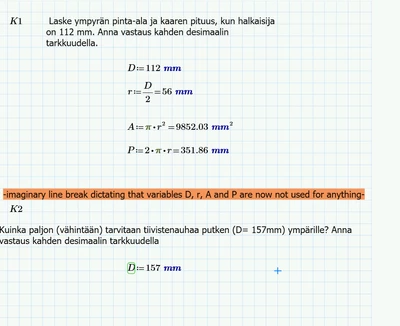
Is it possible to reset variables? For example, if I want to have one file with multiple different calculations inclduing a variable for diameter, is it possible to have a line break or something, so that any variables above it are not used? Therefore variable for diameter needs to be redefined again. 


I know that just re-using the same variable redefines it, and that I could use D, D_1, D_2 and so on, but I do not find these acceptable solutions as it increases potential for calculating errors.


And sorry for asking this, I know this must be a common question, but I don't seem to be finding the old ones.
 

AA_10775414_0-1768204411103.png


Best answer by StuartBruff

There are several potential ways to solve this problem.


The most direct method is to use the build-in Clear for functions, clear and clear.sym.


https://support.ptc.com/help/mathcad/r11.0/en/#page/PTC_Mathcad_Help/variable_clearing_functions.html%23wwID0EAI5EB


Is there a reason why simply assigning new values won't work?


Alternatively, you could write a function to encapsulate your equations. Your main variables could, for example, be passed to the function as its arguments, whilst any other variables could be defined locally within the function.


https://support.ptc.com/help/mathcad/r11.0/en/#page/PTC_Mathcad_Help/about_user-defined_functions.html%23wwID0EAYDQ


Unfortunately, I’m not near a PC at the moment, so can’t give examples. 

Stuart

1 reply

23-Emerald V
January 12, 2026

There are several potential ways to solve this problem.


The most direct method is to use the build-in Clear for functions, clear and clear.sym.


https://support.ptc.com/help/mathcad/r11.0/en/#page/PTC_Mathcad_Help/variable_clearing_functions.html%23wwID0EAI5EB


Is there a reason why simply assigning new values won't work?


Alternatively, you could write a function to encapsulate your equations. Your main variables could, for example, be passed to the function as its arguments, whilst any other variables could be defined locally within the function.


https://support.ptc.com/help/mathcad/r11.0/en/#page/PTC_Mathcad_Help/about_user-defined_functions.html%23wwID0EAYDQ


Unfortunately, I’m not near a PC at the moment, so can’t give examples. 

Stuart

1-Visitor
January 12, 2026

Thank you!


That's exactly what I needed. Would be slightly more convinient if it would clear everything without needing to type every variable, but it's easy enough to copy-paste.


Simply assigning new values works, but it introduces a very high risk for miscalculations. If you forgot to redefine something, it would not be immediately obvious that an incorrect value is being used. but if all variables are clered, it is obviously not possible to end up with wrong results.

23-Emerald IV
January 12, 2026

Unfortunately any form of ALL, or * doesn't work to clear all variables.

Note that you can clear ORIGIN, but you cannot clear NaN:

LucMeekes_0-1768210937025.png

Success!

Luc