1-Visitor
December 17, 2016
Solved

Return a string vertically?

  • December 17, 2016
  • 2 replies
  • 4745 views

Hello,

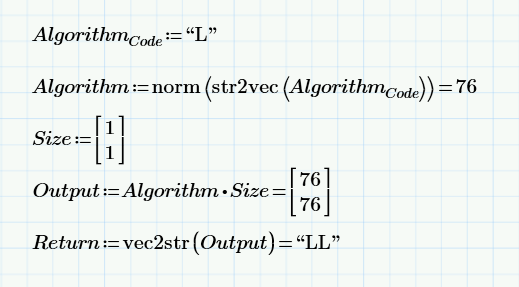
Is it possible to return a string vertically rather then horizontally?  I'm guessing this takes some programming, but I haven't been able to figure it out.  What I'm trying to do is to somehow get "Return" to have the same dimensions "Output", as indicated below.

Thanks for any help!.
PNG 2016-12-17_8-25-43.png

Best answer by Werner_E

Not sure what you would like to see as result!?

A string is not a vector or matrix, so you can't transpose it and there is no way to show a string vertically.

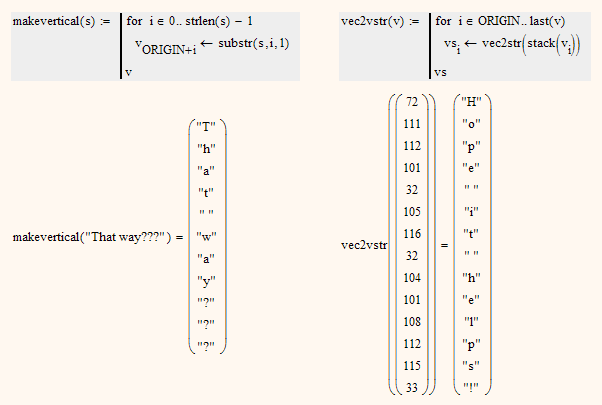
The best I could think of is to create a vector with the single letters as elements. Not sure if this would meet your needs and what it could be good for.

Anyway here its in MC15 but it should work the very same in Prime:

2 replies

24-Ruby IV
December 17, 2016

I do it... as a picture

Werner_E25-Diamond IAnswer
25-Diamond I
December 17, 2016

Not sure what you would like to see as result!?

A string is not a vector or matrix, so you can't transpose it and there is no way to show a string vertically.

The best I could think of is to create a vector with the single letters as elements. Not sure if this would meet your needs and what it could be good for.

Anyway here its in MC15 but it should work the very same in Prime:

acharest1-VisitorAuthor
1-Visitor
December 18, 2016

Hi Werner,

Thank you for your help, I think your suggestion on the right will work perfectly!

I'm on Prime 3.1, any suggestions as to why I'm getting the error.  Sorry if I'm asking basic questions...

2016-12-18_15-00-10.png

And if you're curious, I'm using MathCAD to perform mathematical processing that I'm exporting to an external database for further processing.  I'll be augmenting the vertical strings to additional results (matrices) that will execute particular commands.

23-Emerald IV
December 18, 2016

Would have been nice if you provided the error message .

Building this in Mathcad 11 gives:

Where the error message is: "This function needs more arguments".

It relates to the usage of the stack() function, that requires more than a single parameter (in Mathcad 11).

I guess it's the same problem in Prime.

You can solve it with this:

Where the brackets immediately around v.i, the argument of the vec2str() function, are the brackets of a vector.

One way to get that is with the following trick:

This gives you an array of 1 element.

Now copy the part to the right of the = sign of the last expression, and put that as the argument to vec2str() in the program, and next replace the 0 with v.i and you're done.

But in Prime you should be able to create an empty, one-element vector using the matrix constructor 'Insert Matrix', or just CTL-M.

Success!
Luc