1-Visitor
January 26, 2026
Solved

Roof Live Load

  • January 26, 2026
  • 2 replies
  • 361 views

Good Afternoon, Community,
Would anybody be kind to help on how to program the Roof Live Loads tributary area as one function to take care of column or can I do this in Comb in Mathcad Prime. Please see attached. Thanks,.

Olu


Best answer by Werner_E

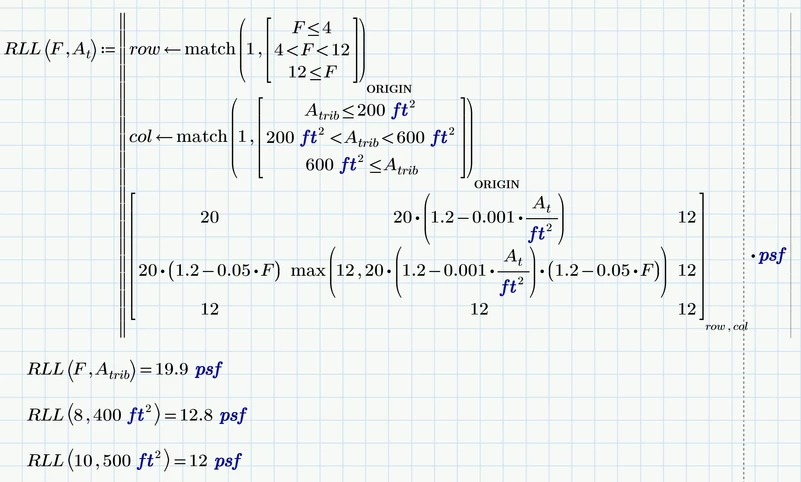
Basically you have five different cases (actually nine, but five return the same value 12).

Your two programs just cover three of them.


What is the meaning of 

Werner_E_0-1769466241117.png

It looks like a boolean comparison which could be true or false (in Prime that's 1 or 0), but I guess it has a different meaning.

I have no experience in your filed of work but according to the table the outcome should be  a load in psf and not as you programmed it an area?


I also don't understand what you mean by  "take care of column" and "do this in Comb"!?


There are many ways to skin a cat, so here is a way which could also easily deal with nine different outcomes and also with larger matrices.

I interpreted the center expression as "at least 12 or more". Not sure if this makes sense, though.
 

Werner_E_0-1769467811982.png

Werner_E_1-1769467855959.pngWerner_E_2-1769467871898.png


2 replies

Werner_E25-Diamond IAnswer
25-Diamond I
January 26, 2026

Basically you have five different cases (actually nine, but five return the same value 12).

Your two programs just cover three of them.


What is the meaning of 

Werner_E_0-1769466241117.png

It looks like a boolean comparison which could be true or false (in Prime that's 1 or 0), but I guess it has a different meaning.

I have no experience in your filed of work but according to the table the outcome should be  a load in psf and not as you programmed it an area?


I also don't understand what you mean by  "take care of column" and "do this in Comb"!?


There are many ways to skin a cat, so here is a way which could also easily deal with nine different outcomes and also with larger matrices.

I interpreted the center expression as "at least 12 or more". Not sure if this makes sense, though.
 

Werner_E_0-1769467811982.png

Werner_E_1-1769467855959.pngWerner_E_2-1769467871898.png


21-Topaz II
January 27, 2026

Hi Werner and Olu

Corrected Werner's sheet to reference At not Atrib.

Capture.JPG


Gets a better surface.

Capture2.JPG

Cheers

Terry

25-Diamond I
January 27, 2026

Ah, yes, thanks! I sure should not have used A.trib in the program instead of A.t.

After that fix the value now never runs below 12 psf.

Werner_E_1-1769493405800.png


BTW, here is a slightly simpler way to get the correct matrix indices 'row' and "col'.

IMHO its clearer and easier to read if we just check for the upper limits. Because of the index ORIGIN we are still correctly using the first index where the condition is fulfilled.

Werner_E_0-1769492494994.png


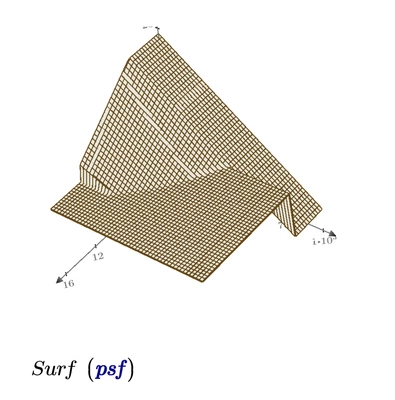
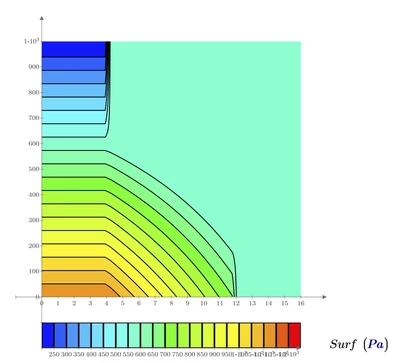
EDIT: Added an attempt to graphically show the nine areas defined by the matrix.

Unfortunately Prime's 3D plots miss a lot of standard formatting options like some sort of transparency. And the contour plot does not allow for additional traces and does not offer marker lines 😞

Werner_E_0-1769494627658.png


21-Topaz II
January 27, 2026

Hi Olu,

Took a different approach as Engineering is full of such tables.

Created a matrix of the table so you know the equations are right and in the proper place.  Easy to check.

Created a function that gets the correct index into the matrix.  Easy to check.


Like I said easy to check and an error in sheet now corrected


Capture.JPG


Cheers

Terry

1-Visitor
January 27, 2026

Thank to all of you, Werner, and Topaz. I learned different approach of doing things in  Mathcad Prime everyday.


Thanks Again.


Boyer
