21-Topaz II
September 20, 2021
Solved

Seeking for the invalid font.

  • September 20, 2021
  • 4 replies
  • 6375 views

Hello everyone,
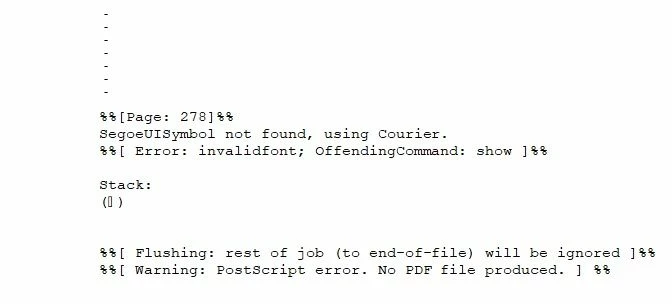
When I start the print preview of a Mathcad 15 worksheet and I try to print it in pdf format, I receive this message:

errore invalid font.jpg


Is it possible to determine the character that generates the error and the non-production of the pdf file?

This problem has happened to me on other occasions in the past. I ran the search excluding parts of the worksheet at each Print Preview. But it takes too much time and luck. I am looking for a faster way.
Thank you very much.


Best answer by Werner_E

As already suggested in the other other thread, I guess you should uncheck "Rely on system fonts only" in the properties menu as already suggested by Luc. It worked for me and I could print your file. But on the other hand I never had problems by just using the print preview as you wrote - I only saw a similar error message like the one you mentioned when I tried to actually print (create a pdf) the file.
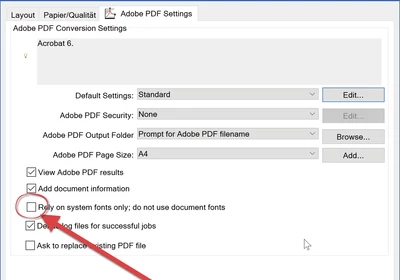
Werner_E_0-1632314958846.png

Unchecking this options allowed me to create the pdf with AdobePDF.

I never had any problems when I just used the print preview (you wrote that you experienced the error already there) but got the same error message you showed when actually trying to print(create the pdf) the file.

The print preview had problems with the display of some characters (either ugly looking or replaced by a rectangle):
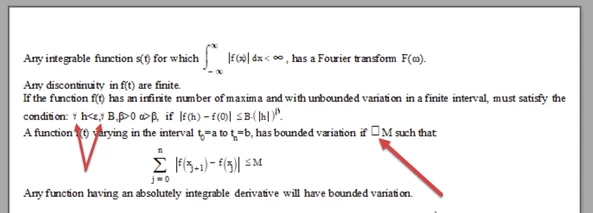
Werner_E_0-1632315774971.png

But the pdf created after printed did not suffer from those problems, even though the fonts looked a bit different from those used in MC and the preview:
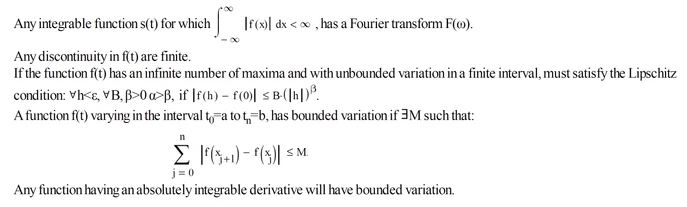
Werner_E_1-1632315857417.png

The text looks a bit condensed with a to small character spacing.



4 replies

23-Emerald IV
September 20, 2021

Open the Mathcad .xmcd file in a plain text editor (Notepad) and search for the string "Segoe". If it is in a piece of text you should have the location there. If Segoe is used in a UserType, you should search for occurrences of that UserType, or simply change the font for that UserType in Mathcad.


Success!
Luc

-MFra-21-Topaz IIAuthor
21-Topaz II
September 20, 2021

I found this:

LucMeekes answer.jpg

what do I do?

23-Emerald IV
September 20, 2021

That's not the one. This appears to be in a picture. Or do you have an .xmcdz file instead of .xmcd.?

Search further..

I expect it to be between { and } , or after a "Font" item.


Success!
Luc

24-Ruby III
September 21, 2021

Try different PDF printers. For example: https://www.cutepdf.com/index.htm

-MFra-21-Topaz IIAuthor
21-Topaz II
September 22, 2021

I finally found where the problem lies: it is made up of several lines of text with formulas inserted. What is the source of the non-production of the pdf file? I attach the file (it is a part of an appendix):

Special.jpg

23-Emerald IV
September 22, 2021

I assume that when you print this sheet 'Special.xmcd' you get the (same) error message.

I've looked through it and to my surprise found no occurrence of

  family="Segoe

In fact it doesn't even contain "Segoe". So something weird is happening.

On closer inspection of the sheet, my hunch is that the problem lies with the backwards E symbol that precedes "M such that". But that's just a hunch, based on the fact that it is the one character that doesn't look the same in the .xmcd file as compared to your screenshot. On the other side the sheet is small enough that you could try what happens if you take that symbol out and print to pdf...


I'm also assuming that you are using the Adobe PDF printer, because looking at that driver I find:

LucMeekes_2-1632311871809.png

This is the interface. Now select 'Properties', to get:

LucMeekes_1-1632311781698.png

(I wonder what effect (un-)ticking "Rely on system fonts..." may have for your case.)

And if you click on Edit (next to Default settings), you get:

LucMeekes_0-1632311661326.png

There's the font SegoeUISymbol. It is not listed in either of the embed options.

Here I wonder what would happen if you set SegoeUISymbol to be either Always, or Never embedded.


Vladimir suggested you should try another 'PDF printer'. Did you do that yet?


Success!

Luc

23-Emerald V
September 22, 2021

Interesting, Luc.   


The character ∀ is the "For All" character (Unicode U+2200).  It is not present in Times New Roman in Character Map (it is present in Mathcad UniMath Prime, though).   When I pasted it from the xmcd file into an Express 7 Text Box, it changed font to SegoeUI.  However, it appears correctly when I change the font to Times New Roman.   


There is a Latin Capital Letter Turned A character (U+2C6F) in Times New Roman that looks like a For All - Ɐ


Stuart

Werner_E25-Diamond IAnswer
25-Diamond I
September 22, 2021

As already suggested in the other other thread, I guess you should uncheck "Rely on system fonts only" in the properties menu as already suggested by Luc. It worked for me and I could print your file. But on the other hand I never had problems by just using the print preview as you wrote - I only saw a similar error message like the one you mentioned when I tried to actually print (create a pdf) the file.

Werner_E_0-1632314958846.png

Unchecking this options allowed me to create the pdf with AdobePDF.

I never had any problems when I just used the print preview (you wrote that you experienced the error already there) but got the same error message you showed when actually trying to print(create the pdf) the file.

The print preview had problems with the display of some characters (either ugly looking or replaced by a rectangle):

Werner_E_0-1632315774971.png

But the pdf created after printed did not suffer from those problems, even though the fonts looked a bit different from those used in MC and the preview:

Werner_E_1-1632315857417.png

The text looks a bit condensed with a to small character spacing.


-MFra-21-Topaz IIAuthor
21-Topaz II
September 22, 2021

the pdf is correct. A thousand thanks.