


Solved

Werner_EAnswer
25-Diamond I
April 26, 2017
I guess you used A. instead of A so to not overwrite built.in units and/or constants.
The only difference I see between the expression you already created and the one you say you would like to see is the multiplication "x" in "0.5m x 0.5m". Or am I missing something?
I guess its a typo you wrote 0,50 m (instead of 0,5 m) and its also a typo you wrote 200kPa instead of 2000kPa, right?
As FM I find the use of "x" for multiplication a bit confusing and misleading as the same character is used for the cross product of two vectors.
.
You can change the default for the multiplication sign from the menu -> Tools -> Worksheet Options -> Display -> Multiplication.
Unfortunately this also changes the (implicit) multiplication sign between value and unit as well and is sure not what you want to see:
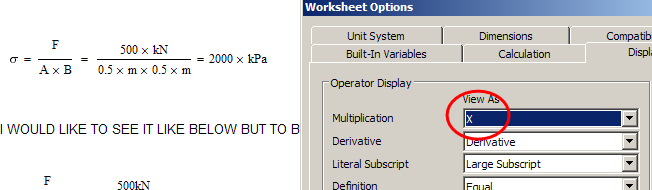
You can change the display of the multiplication via right click menu for definitions you type (you have done that in your sheet when you typed A x B) and for results obtained by numerical evaluation. Unfortunately thats not possible to do in results obtained by symbolical evaluation.
So I guess it will not be possible to get that multiplication "x" in the symbolic result (if thats really what you are after) unless you accept the same character between value and unit (which I think you won't).