1-Visitor
September 28, 2020
Solved

simple loops and operations with variables in Prime 4.0

  • September 28, 2020
  • 2 replies
  • 1979 views

Hello to everybody.

To define loops in mathcad, any release of it, I use the simple statement "m=1,2..nmod", where in this case nmod is the maximum number of modes for an electromagnetic calculation.

Since my background was in fortran or similar languages, I initialized a variable "totcap:=0" and then I tried to increase this value calculating each time terms to be added with respect to the previously calculated one, updating the quantity "totcap", ending the loop with the statement "return m", being m the index that I defined.

Actually, but probably is my trivial error in using Prime, it seems that I mixed variables that cannot be summed...

Attached is the file. May you help me?

Best answer by Werner_E

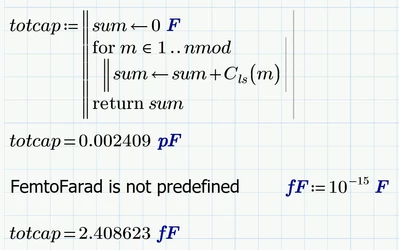
Programming commands like return may only be used inside a program block, not on worksheet level.

Its not necessary to define a range variable m. In a program a for-loop does the job:

Werner_E_0-1601423565488.png


2 replies

rmarcelli1-VisitorAuthor
1-Visitor
September 29, 2020

maybe I solved with the attached file, just using the sum function. Is it correct?

25-Diamond I
September 29, 2020

Yes, its correct and sure a very compact way to do the job (compared to the manual sum programming a sshown in my prior answer).

rmarcelli1-VisitorAuthor
1-Visitor
October 2, 2020

Thank you Werner. Actually, as my past experience is mainly on classical programming I tried to follow simple methods for simple questions.

Thanks, by the way, for the definition of "fF", as it is not defined by default.

Werner_E25-Diamond IAnswer
25-Diamond I
September 29, 2020

Programming commands like return may only be used inside a program block, not on worksheet level.

Its not necessary to define a range variable m. In a program a for-loop does the job:

Werner_E_0-1601423565488.png