1-Visitor
August 16, 2016
Solved

Simple Program Not Working

  • August 16, 2016
  • 2 replies
  • 4545 views

Attachments describe my issue.  Goal of program is to extract all relevant rows from a larger matrix

CabDataCu for further analysis. The program is set to test for "0" in column 1 of CabDataCu and if

not "0" extracts the row.   Programs works properly to ignore matrix rows below 5 and extracts 1-5.

The problem that befuddles me now is that it misses, i.e. does not ignore or jump over matrix Row

4 with a "0" in the first column.  I have tried several variants of the program statements and all have

ended up with same result.  Any ideas?

Best answer by Werner_E

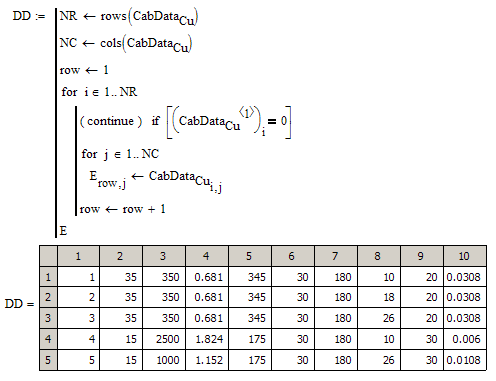
As Mark already said you need a separate row counter for your result matrix.

Maybe like this:

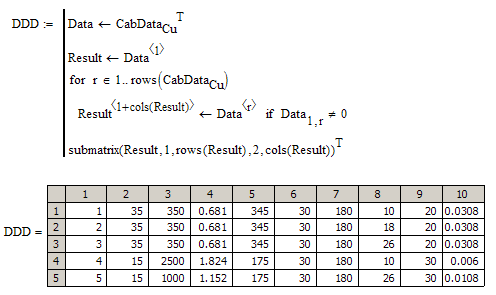
Here is a different approach:

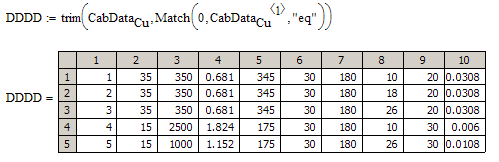
Here is an approach using routines from the Data Analysis Extension Pack

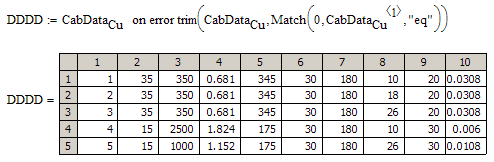
and her the same but with an error check so the routine does not fail if no row has to be trimmed.

Werner

2 replies

1-Visitor
August 16, 2016

You're using the same variable, i, for the row index of both the source and result matrices.  When the program gets to the 5th row and sees relevant data, it stores that data in the 5th row of the result matrix.  If you want the 5th row of the source matrix to be stored in the 4th row of the result matrix, you need to use a different row index variable for the source and result matrices.

Werner_E25-Diamond IAnswer
25-Diamond I
August 16, 2016

As Mark already said you need a separate row counter for your result matrix.

Maybe like this:

Here is a different approach:

Here is an approach using routines from the Data Analysis Extension Pack

and her the same but with an error check so the routine does not fail if no row has to be trimmed.

Werner

12-Amethyst
August 17, 2016

Hi Werner.

Or you have a lot of files ending at _WExxxxxx, or you came from a year back to the future.

Best regards.

Alvaro.

25-Diamond I
August 17, 2016

No, its simply  year-month-day, so the 17 at the end is the day, not the year. 😉

But probably I should rather prepend it to the original file name for sorting purposes if some day I'd like to go back to the past.

BTW, the last approach wrongly returns the full original matrix in the case when the first column contains only zeros. It should return something like NaN in that case.

But I guess that will be no problem for Paul as this case is quite unlikely.

Anyway ->

There is still one drawback and thats a limitation of match (and also of Match with "eq"). Any value in the range triggervalue +- TOL will trigger the row trimming. So with the default TOL=10^-3 a value of 0.001 or -0.0001 in the first column will get the row eliminated.

Also possibly no problem for this application as I just see integers here.

Werner