20-Turquoise
March 13, 2013
Solved

Simplifying.

  • March 13, 2013
  • 3 replies
  • 3644 views

Hello, Everyone.

A.PNG

Simplify A ?

Thanks in advance for your time and help.

Best Regards.

Best answer by Werner_E

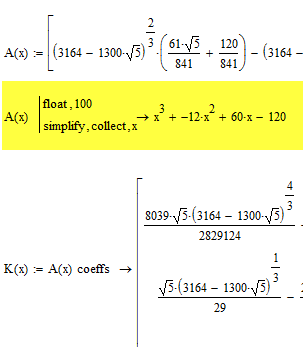
Even simpler like this. While I think that Mathcad should be able to simplify it in exact mode.

Notice that I formatted the expession using the Result Format menu, otherwise the 120 would show as 199.9999999....

See below how to prove with Mathcad in exact mode that the coefficients 60 and -120 are exact.
simplify2.png

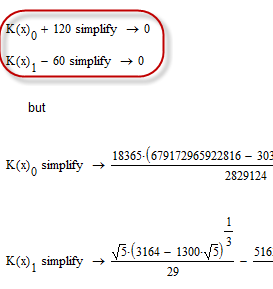
Mathcad is able to do it in exact mode, all it needs is a ridiculous simple help (it should not be necessary):
simplify4.png

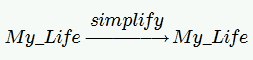
BTW, don't bother with Valery's file - it's in Prime format and he is just joking around - thats the whole content:
Simplify_Valery.png

3 replies

24-Ruby IV
March 13, 2013

Help me please with simplifying too - see the attach!

1-Visitor
March 13, 2013

simplify.GIF

Viktor

lvl10720-TurquoiseAuthor
20-Turquoise
March 13, 2013

Many thanks for your response, Viktor and Valery.

Valery, my Mathcad 14 can not open your file.

Viktor, give me a time.

Best Regards.

Loi.

Werner_E25-Diamond IAnswer
25-Diamond I
March 13, 2013

Even simpler like this. While I think that Mathcad should be able to simplify it in exact mode.

Notice that I formatted the expession using the Result Format menu, otherwise the 120 would show as 199.9999999....

See below how to prove with Mathcad in exact mode that the coefficients 60 and -120 are exact.

simplify2.png

Mathcad is able to do it in exact mode, all it needs is a ridiculous simple help (it should not be necessary):

simplify4.png

BTW, don't bother with Valery's file - it's in Prime format and he is just joking around - thats the whole content:

Simplify_Valery.png

lvl10720-TurquoiseAuthor
20-Turquoise
March 15, 2013

Hello, Everyone again.

Factor.PNG

Best Regards.

25-Diamond I
March 15, 2013

Loi Le wrote:

Hello, Everyone again.

Factor.PNG

Best Regards.

No, as already said, using float means you are leaving the road of exact results. Thats the reason for my efforts to avoid float in symbolics. Nevertheless the first float was necessary to see what the result could be and to suspect that 60, 12 and 120 could be the exact results.

BTW, Mathcad won't factor for non integers anyway.

simplify5.png
