Skip Blank Rows in READEXCEL
Hello Community,
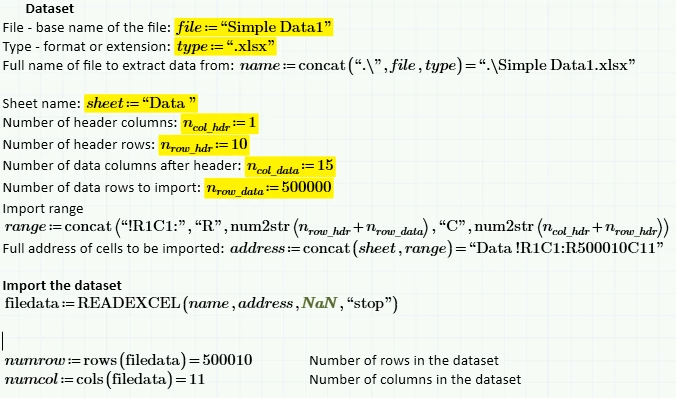
I am working on a Mathcad Prime 5.0.0 worksheet. My goal is to import data from Excel, and later in my worksheet run data analysis for the found set. I am struggling a bit to emulate the behavior for CSVs where the imported data is limited to non-blank rows and columns (once it finds the empty rows and columns it automatically stops importing). The help indicates a way to command READEXCEL to "stop" on a blank row. The problem is that I cannot get it to work. Maybe the previous emptyfill parameter where you fill blanks with something is preventing the "stop" on blank? I cannot figure out how to make it work, and all of the examples use only the most basic inputs. Any ideas?
The screenshot shown below shows that though I try to "stop" on blankrows, it is persisting; I get all 500010 rows even though there are only 180k lines of data. Perhaps the substitute of NaN is the issue? I have also specified "" as the emptyfill and gotten the same result.