1-Visitor
March 24, 2015
Question

Solve block error

  • March 24, 2015
  • 4 replies
  • 4310 views

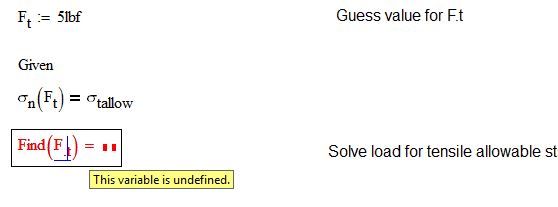
Can anyone help me figure out why my mathcad sheet won't solve? I tried inputting a guess value and solving with the Find function to no avail.

Capture.JPG

4 replies

24-Ruby III
March 25, 2015

Here is a solution obtained in Mathcad Prime:

Pic_1.png

1-Visitor
March 25, 2015

Haven't quite converted to Mathcad prime. But thanks!

24-Ruby III
March 30, 2015

But you can use Mathcad Prime Express version to read ".mcdx" file format: Free Math Software Download | PTC

19-Tanzanite
March 25, 2015

Try using root instead - see attached.

Alan

1-Visitor
March 25, 2015

This doesn't explain why my solve block wouldn't work but the answer comes out. Thanks Alan.

23-Emerald I
March 25, 2015

I don't know why your solve block won't work, but for this problem anyway you don't need a solve block.

1-Visitor
March 25, 2015

Thanks Fred for putting in effort.

19-Tanzanite
March 26, 2015

Immediately after figure 3 and the text "Bolt group geometry" you have the keyword "given". Delete it. Mathcad does not like having two "given" keywords with nothing to close out the solve block for the first one. Once you have done that, right click in "Find" and force it to a non-linear method. It is trying to solve it as a linear equation (which in fact it is), but can't.

24-Ruby III
March 30, 2015

Good catch, Richard . By the way in Prime this error is not perceived, as in this case is used block of solution.