1-Visitor
October 10, 2019
Solved

Solve block error: "Not a valid constraint"

  • October 10, 2019
  • 16 replies
  • 9196 views

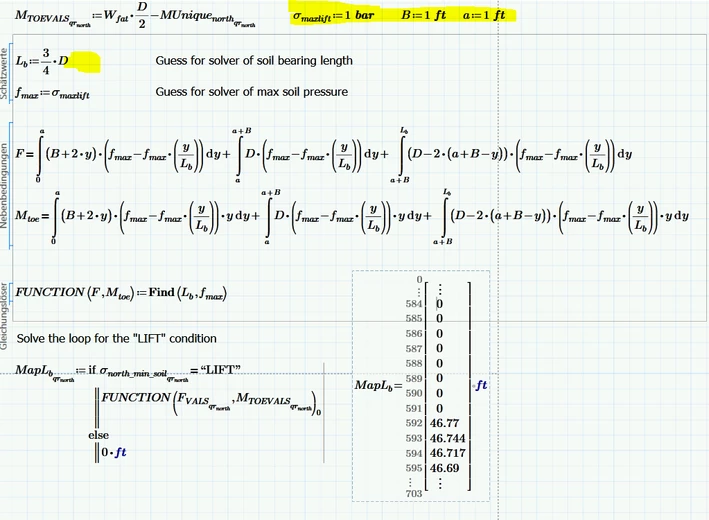
In the attached image of a mathcad prime 3.1 worksheet I'm attempting to call the function in a solve block and from another function. I receive the error: "This is not a valid constraint, Use, for example, the equal to operator."


Am I making a syntax error that I'm not aware of?

Best answer by Werner_E

I had not noticed that in the meantime you added the worksheet.


There are three problems:


1) The inline evaluation when you specify the guess for L.b. This is responsible for the irritating error message, Delete the equal sign after 3/4*D


2) You specify the guess for f.max to be sigma.maxlift, but sigma.maxlift ist not defined in your worksheet. You have to provide a value!


3) You have to define B and a, too, or you make them additional arguments of your function FUCNTION.


Here is a screen shot where I had chosen arbitrary values just to show that it works now:

clipboard_image_0.png

16 replies

24-Ruby IV
October 10, 2019

1. Send please the Mathcad-sheet.

2. Try in first line so

A:=find...

and than

A(x):=find...


dsochor1-VisitorAuthor
1-Visitor
October 10, 2019

Thanks ValeryOchkov. The worksheet is currently 91 pages, I'll try to shorten it and then post it.


What do you mean by "Try in first line so..." 


Do you mean adding FUNCTION:=Find(,) and then under it FUNCTION(F,Mtoe):=Find(,)?

The solve block seems to only like one :=Find


24-Ruby IV
October 10, 2019

Yes! 

23-Emerald IV
October 10, 2019

In your MapLb function, you call the function FUNCTION with and index: Can't see it well (you should always attach a worksheet!), I believe it's index 11.

But FUNCTION is the result of the solve block above. It isn't a vector, so you cannot index it.


Success!
Luc

dsochor1-VisitorAuthor
1-Visitor
October 10, 2019

Thanks LucMeekes. I've attached a worksheet (and referenced excel) and removed the indexes but still no luck

25-Diamond I
October 10, 2019

have you tried to call the solve block FUNCTION in a separate region with the very same arguments?

have you tried to use the trace option in the calculation menu to see if the error traces back to the solve block?

Werner_E25-Diamond IAnswer
25-Diamond I
October 10, 2019

I had not noticed that in the meantime you added the worksheet.


There are three problems:


1) The inline evaluation when you specify the guess for L.b. This is responsible for the irritating error message, Delete the equal sign after 3/4*D


2) You specify the guess for f.max to be sigma.maxlift, but sigma.maxlift ist not defined in your worksheet. You have to provide a value!


3) You have to define B and a, too, or you make them additional arguments of your function FUCNTION.


Here is a screen shot where I had chosen arbitrary values just to show that it works now:

clipboard_image_0.png

dsochor1-VisitorAuthor
1-Visitor
October 10, 2019

Thank you Werner_E. The undefined values have been added and the inline equal has been removed. The error now resides with the Lb/ft in the Find() portion of the solve block. Unfortunately the error tracing offers no movement options and pulling the FUNCTION() outside the solver block results in an error.

24-Ruby IV
October 10, 2019

B - ?

a - ?

M.toe - ?

Find.png

dsochor1-VisitorAuthor
1-Visitor
October 10, 2019

Thanks Valery, I've defined B and a in the revised attached mathcad and Mtoe is one of the constraints of the solve block. Does it need to be defined outside the block as well?

25-Diamond I
October 10, 2019

Mtoe is one of the constraints of the solve block. Does it need to be defined outside the block as well?

No! You provide it as a function argument. That's perfectly OK.