7-Bedrock
April 28, 2025
Solved

solve block query

  • April 28, 2025
  • 1 reply
  • 677 views

I am just trying to get my solve block to work. I wonder if I am inputting anything wrong. I know what the answer should be; it's a very simple calculation. However, I just want to get my solve block working. 

Attached sheet. Error on the last page.  sheet attached. 

Best answer by Werner_E

I am not sure whats going on and it may be a bug in Prime.

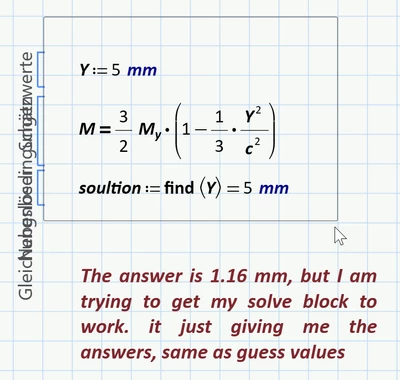
When I load your sheet I see this
Werner_E_0-1745839521467.png

Obviously, as you stated, Prime is not calculating but just returns the guess value. What I see when I load the sheet is the state you saw before saving the file.

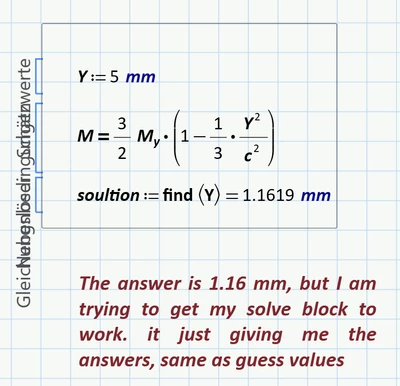
BUT when I (without making any changes whatsoever) click in some empty space in the sheet and press F9 to let the complete sheet recalculate, things seems to straighten and I get the correct result:
Werner_E_1-1745839675310.png

I also tried to type the whole solve block again from anew. I had to manually label some variables as being "Variable" but then got the correct resault.

So I am not sure why you experienced that strange effect.

Not sure if it has something to do with it but I am using the interims-version 10.0.1.0 of Prime.


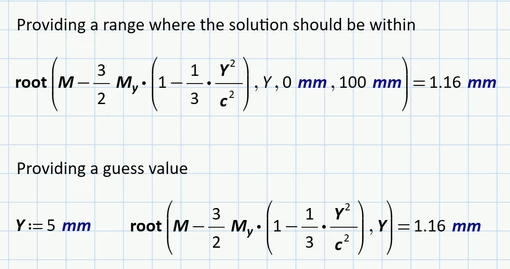
BTW, you sure know that you could also use the "root" function to solve equations in one variable:
Werner_E_0-1745840214630.png


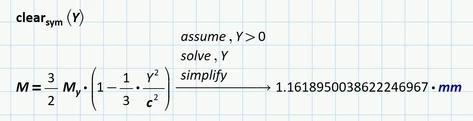
You sure could also use the symbolic "solve" but I would advise against using it. 
Werner_E_1-1745840360403.png

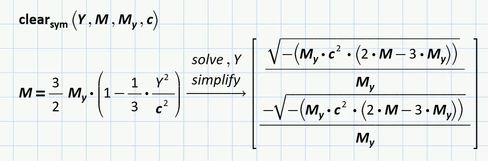
Should normally only be used when you really are looking for a symbolic solution, like
Werner_E_2-1745840430083.png


1 reply

Werner_E25-Diamond IAnswer
25-Diamond I
April 28, 2025

I am not sure whats going on and it may be a bug in Prime.

When I load your sheet I see this

Werner_E_0-1745839521467.png

Obviously, as you stated, Prime is not calculating but just returns the guess value. What I see when I load the sheet is the state you saw before saving the file.

BUT when I (without making any changes whatsoever) click in some empty space in the sheet and press F9 to let the complete sheet recalculate, things seems to straighten and I get the correct result:

Werner_E_1-1745839675310.png

I also tried to type the whole solve block again from anew. I had to manually label some variables as being "Variable" but then got the correct resault.

So I am not sure why you experienced that strange effect.

Not sure if it has something to do with it but I am using the interims-version 10.0.1.0 of Prime.


BTW, you sure know that you could also use the "root" function to solve equations in one variable:

Werner_E_0-1745840214630.png


You sure could also use the symbolic "solve" but I would advise against using it. 

Werner_E_1-1745840360403.png

Should normally only be used when you really are looking for a symbolic solution, like

Werner_E_2-1745840430083.png


7-Bedrock
April 29, 2025

awesome thank you!!!
