You have to know that the engine to do the symbolic calculations like "solve" is nothing native to Prime. This engine does not know anything about units and treats them as unknown variables. Furthermore units are not always seen as units in symbolic calculations as you can see in the results you get that not all units are displayed in blue.
It often helps to turn on "Units/Constants in Symbolics" in the Calc options
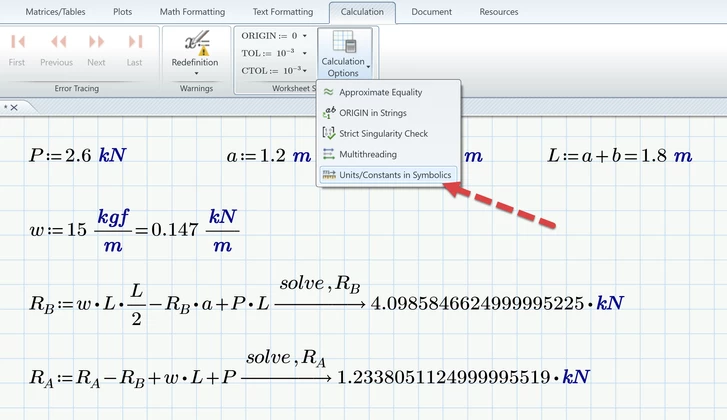
As the screenshot shows it actually helps in your case and its a good idea to turn on this option by default.
But the symbolics still don't understand units. Lets display w in N/m instead of kN/m
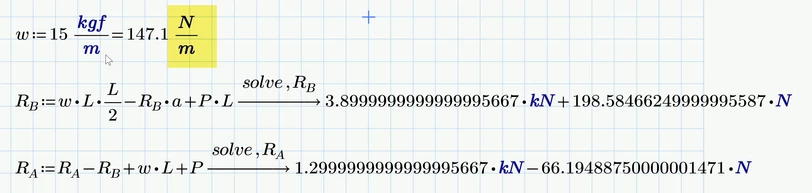
The symbolics does not know that kN=10^3 N and treats kN and N as two different variables and so can't simplify it result any further.
But R.B and R.A still can displayed using numeric evaluation

Using numeric evaluation also allows you to change der default unit N to kN, something you can't do in symbolic results.
But as a rule you should only use the symbolics if you need a symbolic, non-numeric result.
For numeric result its better to use Primes native numeric methods. These are a solve block with "find" or the "root" function.
You can use the root function in two ways - either provide a range within the solution should be found (I show this for R.B) or you provide a guess value (as shown for R.A).

I usually prefer the root function over the solve block because a solve block looks ugly and unnatural and takes up a lot of space. I use a solve block with "find" if there are additional constraints which have to be considered.
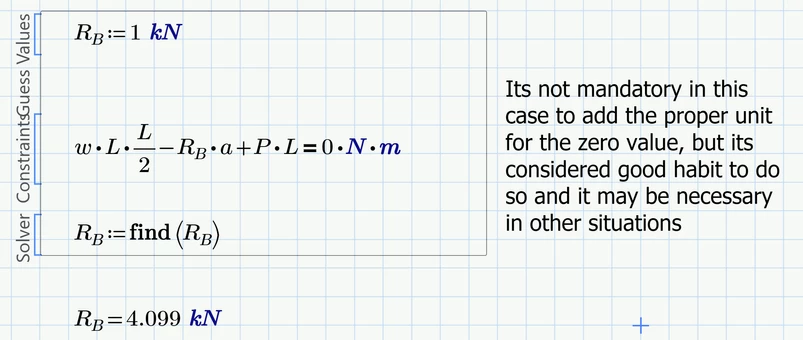
Nonetheless here a solve block for R.B (you must always provide a start/guess value)