10-Marble
February 13, 2025
Solved

solve issue

  • February 13, 2025
  • 1 reply
  • 1075 views

Hi guys, can anyone help explain why this doesn't work?
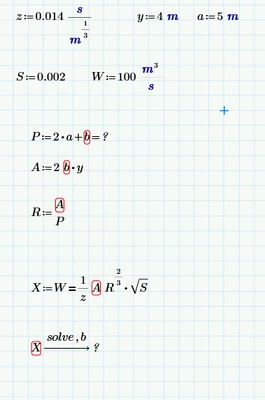
 

S1_1-1739447552822.png

I tried whatever I could to find out what is the problem with no success.


Thanks.

 

Best answer by Werner_E

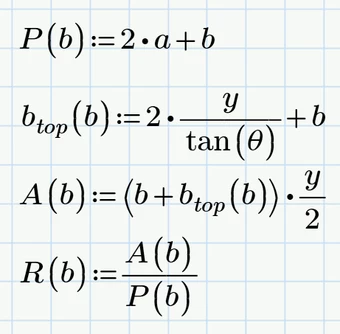
Instead of substituting and working with a huge expression I would rather prefer to turn all expressions depending on the variable b into functions of b.

Werner_E_0-1739712372171.png


You can then use the "root" function by providing a range (values to the left and to the right of the root)

Werner_E_1-1739712452621.png

Or you can use the "root" function by providing a guess value

Werner_E_2-1739712522087.png

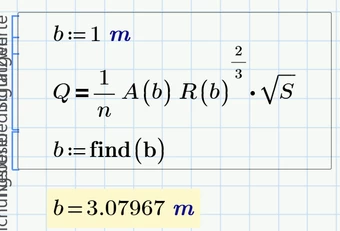
And of course you also could use a solve block with "find"

Werner_E_3-1739712574522.png


Prime 10 sheet attached

1 reply

25-Diamond I
February 13, 2025

Why don't you attach your worksheet?


Delete the equal sign at the end of the definition of P.


But I don't think that Primes symbolics will be able to solve your equation. Furthermore it seems to me that your equations is in no way unit consistent!


You definition of P adds 2a ( a length) to b, so b must be a length, too, as will be P.

A is an area and so R is again a simple length.

So in your expression X, the left hand  side (W) is defined as being an acceleration (m/s^2), but the right hand side would end up with units m^3 / s. So there seems to be something wrong with the units or with the expressions!


If you can fix the unit problem, it may be more appropriate to formulate your assignment as functions of b and then use a numeric method like the "root" function to get your numeric result for b.,

S1_0110-MarbleAuthor
10-Marble
February 16, 2025

Thank you, Werner, for your reply.

I attached the two methods I tried. units are correct. if you assign b = 2m for example, you get a correct unit at the end.

Appreciate if anyone could help.

23-Emerald IV
February 16, 2025

Substitute your variables A, P, R and b.top, and then use the root function:

LucMeekes_0-1739703222408.png


Success!

Luc