10-Marble
December 29, 2024
Solved

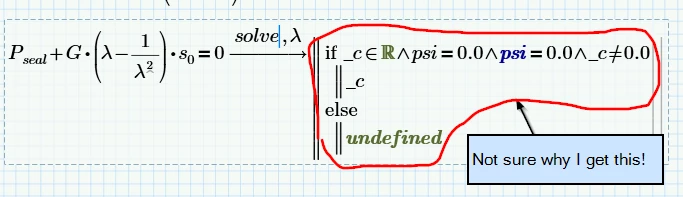
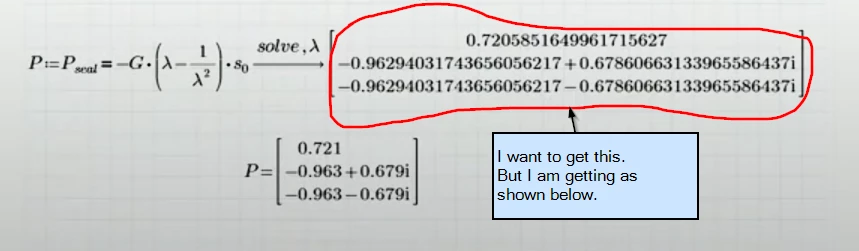
solve,L Not working

  • December 29, 2024
  • 2 replies
  • 1267 views

I am exploring solving equations.

Took a utube video.

My workng file attached here to.
2024-12-28 23_56_32-Mathcad Prime - Solve Blocks & Symbolics Webinar - YouTube and 1 more page - Per.png

2024-12-28 23_51_02-PTC Mathcad Prime 10.0.1.0 - D__Vault WS_Vault Projects_TRAINING_02 MATHCAD_01-0.png

I would like to get around this issue,

Pl. help.

 

Best answer by terryhendicott

Do it as indicated. 

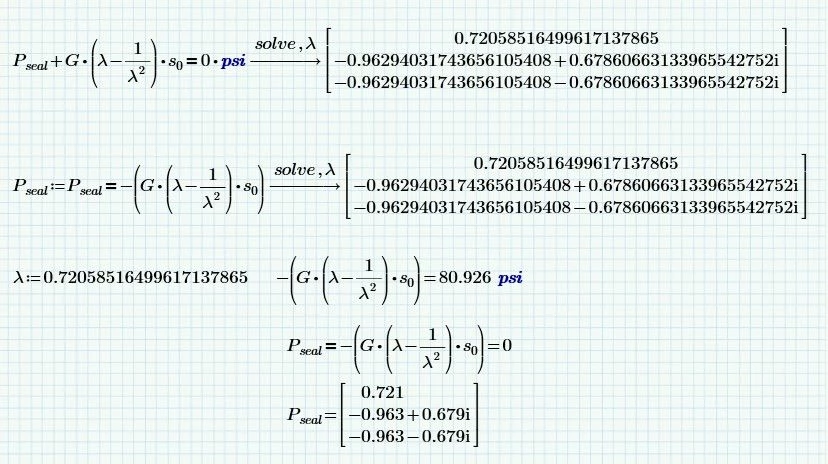
One equation (shown one) sets a result to a comparison resulting in Pseal either one or zero. so the equation being solved is -(G*(lambda-1/lamda^2)*so equal to 1 or zero.  Then sets Pseal to the answer.

The first simply needs a unit added for the equality comparison to make sense.

Capture.JPG

2 replies

21-Topaz II
December 29, 2024

Do it as indicated. 

One equation (shown one) sets a result to a comparison resulting in Pseal either one or zero. so the equation being solved is -(G*(lambda-1/lamda^2)*so equal to 1 or zero.  Then sets Pseal to the answer.

The first simply needs a unit added for the equality comparison to make sense.

Capture.JPG

25-Diamond I
December 29, 2024

@terryhendicott 

Are you using the current Prime 10.0.1.0 ?

When I open your sheet and let it recalculate i get an error (variable P.seal not defined)

Reason seems to be the inline evaluation after the definition of P.seal.

Werner_E_0-1735483451448.png

When I delete the inline assignment, I see this:

Werner_E_1-1735483540068.png


Only if I define P.seal using the the unit psi right away it works as desired (and it does not matter if the unit psi is added to the zero or not)


Werner_E_2-1735483785920.png

The symbolics used to use the latest expression in a series of evaluations and so it should use the value in psi when we use the inline evaluation.

I don't know why it throws an error when using the inline eval now and it looks to me as a new bug.


So if you don't use the latest release of Prime 10 it may be a bug introduced in the latest 10.0.1.0

EDIT: It may have nothing to do with the latest release but seems to be a problem with a combination of language setting and unit system setting.
See my answer below.


25-Diamond I
December 29, 2024

Hah!!

The aforementioned results were obtained when using Prime 10 in its native language setting which is German in my case.

When I start Prime using the command line parameter "/culture:en-US" to run in English, I get the desired result when I let the sheet of @RWickrama  recalculate without making any changes..

Werner_E_3-1735484386832.png

@RWickrama 

Which language do you use Prime in?


Further  observations using Prime in German:

When I let the original sheet recalculate, I get again the undefined variable error:

Werner_E_4-1735484728326.png


When I switch from unit system USCS to SI, I get this

Werner_E_5-1735484816493.png


Of course the symbolics does not know anything about units and can't see that Pa and psi are units of the same dimension,

So I used inline evaluation at the definition of G as well to use Pa instead of psi, and , voila!

Werner_E_6-1735484957509.png


So its clearly a bug. The problem is a combination of language setting and unit system setting.

Somebody may care to report it to PTC R&D.


23-Emerald IV
December 29, 2024

You could first solve for the general solution, then fill in the data. Like this:

LucMeekes_0-1735469438998.png

(Gives a huge result vector, potentially too large to display.

LucMeekes_1-1735469493127.png

But you now have a function lambda of three parameters that you should be able tom use.)

Then  define your data:

LucMeekes_2-1735469555130.png

And calculate the result:

LucMeekes_3-1735469586590.png

In case you are only interested in the real result (as opposed to the complex ones):

LucMeekes_4-1735469783880.png

But if you specifically want a complex result:

LucMeekes_5-1735469841560.png


Success!
Luc