

8-Gravel
September 4, 2024
Solved

Solve not working

  • September 4, 2024
  • 2 replies
  • 1759 views

Solve is not working for symbolic. Am I doing something wrong or is there any possible way to get an answer for this ? 

Best answer by Werner_E

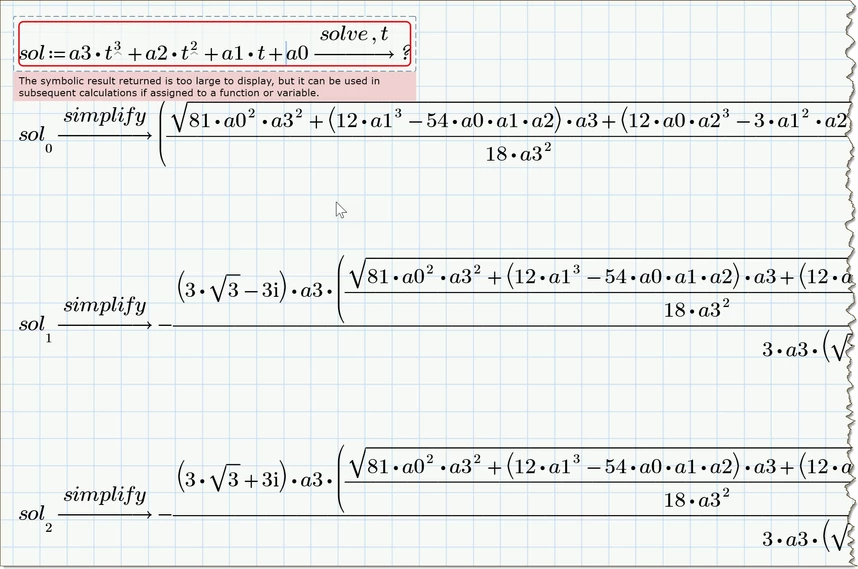
While Prime refuses to display the vector with the three results for a generic cubic equation, allows you to display each of the three solutions individually.
Werner_E_0-1725488090695.png


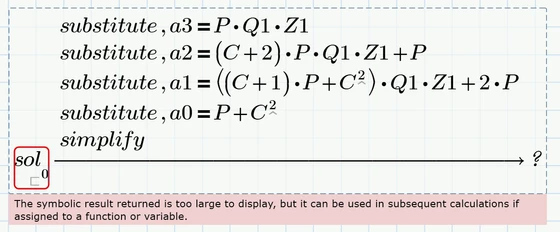
Unfortunately when we use the substitution suggested by Luc, the expressions again are too large ... 😞
Werner_E_1-1725488134236.png


2 replies

23-Emerald IV
September 4, 2024

Solve IS working. It found an answer, but, as the message says, it's too large to display.

You can assign the result to a function, e.g. by putting

t(C,P,Q1,Z1) :=

in front of it, and evaluate that function with numerical values for C, P, Q1 and Z1.


Success!
Luc


P.S. In case you're interested to know how large 'too large' can be, here is the set of solutions to your problem:

LucMeekes_0-1725442188926.png

Yes, it's in the picture just above this line...You'll need to zoom in.

Oh, and in case you are wondering: NO, Prime 10 will not show you the result either. It can only be shown by Mathcad 11 (not to be confused with the not yet existing Prime 11).

There may be one option though. If you solve this:

LucMeekes_0-1725443108662.png

does it show? If yes, you can then substitute the four variables a3...a0 with the proper expressions in C, P, Q1 and Z1 for each of the three solutions, and hopefully those results will be not 'too large' to display.

8-Gravel
September 4, 2024

Hello @LucMeekes ,


Despite applying the function as instructed, I am still encountering the same issue. It appears that the problem persists even after the recent changes were made.

Unfortunately, the image provided with the modifications is not clear enough for me to discern the details, even when zoomed in. Could you please share the updated worksheet directly? This would greatly assist me in understanding the changes made and in resolving the issue effectively.


Sam

19-Tanzanite
September 4, 2024

Mathcad Prime 10 is not able to show (so, not solve, but to show) solution results for this third order like equation you want to solve:

Cornel_0-1725449888905.png


Mathcad Prime 10 is able to show solution results only up to second order like equation:

Cornel_1-1725449976252.png


But as Luc said you can assign a function and then put numbers into this function for each variables:

Cornel_2-1725450033507.png


Or if you truly want to see the solution results for this third order equation you need to switch to other math software (like Mathcad 11 as Luc showed, maybe Matlab, etc), more capable than Mathcad Prime 10 and to hope that these other math solftware more capable than Mathcad Prime are able to show your desired solution results!


12-Amethyst
September 5, 2024

factor a3 isn't needed, if the equation is simplified, Prime can (just) handle it:

AndyWesterman_0-1725526164542.png

Note, without the "simplify" key word,  the result is still too large to display...

AndyWesterman_1-1725526446480.png