

1-Visitor
April 15, 2015
Solved

solve problems; is there a better way?

  • April 15, 2015
  • 8 replies
  • 2900 views

Hi there,

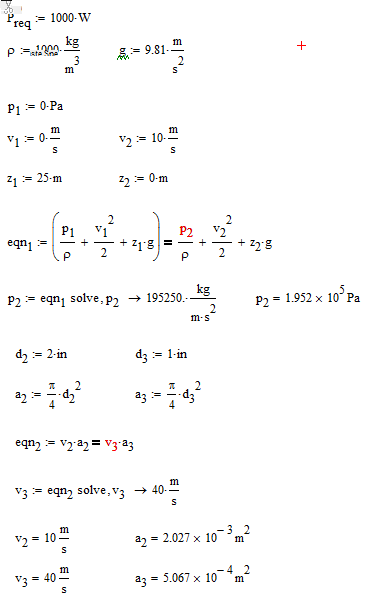
I'm poking around in MathCAD trying to get through a pelton wheel design. I was looking forward to writing equations and telling MathCAD to solve them, even simple single variable ones. It seems to work okay but it's quite clunky, and my most recent one simply wont solve.

Could someone please look at this and suggest best practices and also perhaps a way to fix my last solve? Is there a 'sleeker' way to do solves? In some similar programs you can just throw a ----> and it automatically selects, solves, spits out, and defines the variable
Best answer by LucMeekes

Hi Luke,

It appears like Mathcad Prime is not up to this level of symbolics yet. You're doing nothing wrong.

This is the result with good old Mathcad 11

Pelton.png

You might try the same in Mathcad 15, which you (can) have installed next to Prime 3.1 using the same license. I've attached my Mathcad 11 source.

Success!
Luc

8 replies

LucMeekes23-Emerald IVAnswer
23-Emerald IV
April 15, 2015

Hi Luke,

It appears like Mathcad Prime is not up to this level of symbolics yet. You're doing nothing wrong.

This is the result with good old Mathcad 11

Pelton.png

You might try the same in Mathcad 15, which you (can) have installed next to Prime 3.1 using the same license. I've attached my Mathcad 11 source.

Success!
Luc

lpighetti1-VisitorAuthor
1-Visitor
April 15, 2015

Hi Luc,

Thanks for giving it a spin in Mathcad 11. I'm glad, and sad, that it wasn't my error.

I've heard some concerns about Mathcad Prime on here, but I didn't think much of them. I'm looking for a program like Mathcad Prime to aid me as I continue self study beyond what my engineering degree provided. Would you recommend starting with Mathcad 15 or perhaps another program? I love the WYSIWYG style layout of Mathcad over other options such as MATLAB, but I am not well versed in the software options out there.

I originally considered Mathcad Prime after I saw my friend, a chemical engineering student, blasting out some pretty amazing solves. I've only used it for simple algebra thus far.

Thank you

Luke

19-Tanzanite
April 15, 2015

I can't read your Mathcad Prime file because it was created in version 3.1, but Luc's sheet works fine when I convert it to Mathcad Prime 3.0.

There is a bug with multithreading in Prime 3.1. make sure it's turned off.

5-Regular Member
April 16, 2015

Hi Luke,

Regarding why eqn_2 in Part 2 of your worksheet doesn't solve in Prime, it's an issue with variable labeling. Labeling is a very helpful feature in Prime, but it can lead to some confusion if the auto-labeling doesn't do as expected. I can't fully address why this labeling confusion occurred in your worksheet as I don't know how it was built, but there are two ways to get the symbolic solver to work:

1) Click on v_3 above the symbolic evaluation operator. You'll notice from looking at the Labels dropdown in the Math tab that Mathcad has not given it a label. When you click on the variables written out in your eqn_2 definition, these are all labeled as variables. They look to be hard-labeled (i.e. labeled manually instead of having Mathcad auto-label), so that could be what happened to cause the Labeling confusion. If you hard label a variable, you have to make sure you're consistent. Anyway, just click on the un-labeled v_3 and go to the Labels dropdown and select "Variable" to hard-label it as such. You should get a result.

2) Usually this manual labeling is not necessary, as Prime does a pretty good job of taking care of this. To show my point, as an alternative to #1 above, simply delete the definition and symbolic evaluation of eqn_2 and retype them from scratch, without applying any manual labels. Once done, the symbolic solution should appear.

Take care,

Luke Westbrook