15-Moonstone
March 29, 2018
Question

Solve Root of Equation by Matix in Mathcad Prime

  • March 29, 2018
  • 2 replies
  • 12034 views

Dear All,

How let Prime Solve Root of Equation by Matix ?

Many thank.
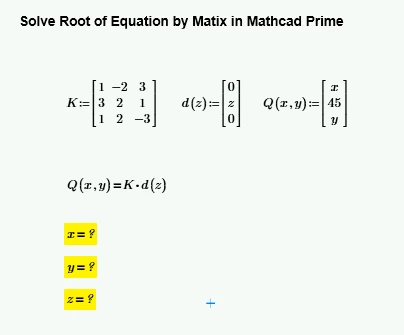
PC-15.png

2 replies

25-Diamond I
March 29, 2018

My first try was to copy the equation you want to solve and use the symbolic solve command ... and it fails

B1.png

I retyped the equation myself and ... it worked!

B2.png

Confusion, but after playing around a little bit I found out that its again Primes auto labeling which causes the error. This "feature" is more pain than anything. If you manually set the label of x and y in the expression Q(x,y) from "variable" to "automatic" it also works with the expression you have typed.

And of course you always can use the good old numeric solve block, which most of the times is the better alternative to symbolics anyway if you are just after numeric results. The solve block seems to be much less sensible concerning labels - it also works using the original expression.

B3.png

15-Moonstone
March 29, 2018


@Werner_E wrote:

My first try was to copy the equation you want to solve and use the symbolic solve command ... and it fails

B1.png

I retyped the equation myself and ... it worked!

B2.png

Confusion, but after playing around a little bit I found out that its again Primes auto labeling which causes the error. This "feature" is more pain than anything. If you manually set the label of x and y in the expression Q(x,y) from "variable" to "automatic" it also works with the expression you have typed.

And of course you always can use the good old numeric solve block, which most of the times is the better alternative to symbolics anyway if you are just after numeric results. The solve block seems to be much less sensible concerning labels - it also works using the original expression.

B3.png


Thank you so much  @Werner_E . it working.

but I have question relate to  this topic as Pic Attach and File Attach
1. Create Auto Variable in Matrix?

2. Solve those Variable?
Many Thank,

PC-16.png

23-Emerald IV
March 29, 2018

Mathcad (including any version of Prime) is NOT capable of automatically creating variables. But Prime 'labels' items you create, and one of the possible label values  is 'automatic'.... for whatever reason. You can also have 'variable', 'unit', 'constant' etc.

LM_20180329_Labels.png

If you have your cursor on an item and tick the 'labels' selector, you will see the type of label associated with your item. Items with the same name, but with a different 'label' are treated as different items by Prime.

If you want, or need to, you can set the label type of your variable to 'automatic'. This does NOT mean it is automatically created.


Success!
Luc

21-Topaz II
March 30, 2018

Hi


PDF to answer your problem

15-Moonstone
April 3, 2018

@terryhendicott wrote:

Hi


PDF to answer your problem


hi!  terryhendicott

Can you note me on your pdf file that solve my Problem? please
Many thank

21-Topaz II
April 3, 2018
