
8-Gravel
July 23, 2025
Solved

Solving for Unknown Matrix Variable in MathCad Prime 11 Solve Block

  • July 23, 2025
  • 2 replies
  • 687 views

Hello everyone,

I'm attempting to determine the unknown variable V_Node from an equation involving 3x1 matrices.

I'm currently using a solve block for this purpose, but I'm not getting any calculated result.


Could anyone please help me identify where I might have made a mistake in the solve block? I've attached the MathCad Prime 11.0.0 (.mcdx) file for reference.


Thank you in advance for your assistance!
Best answer by Werner_E

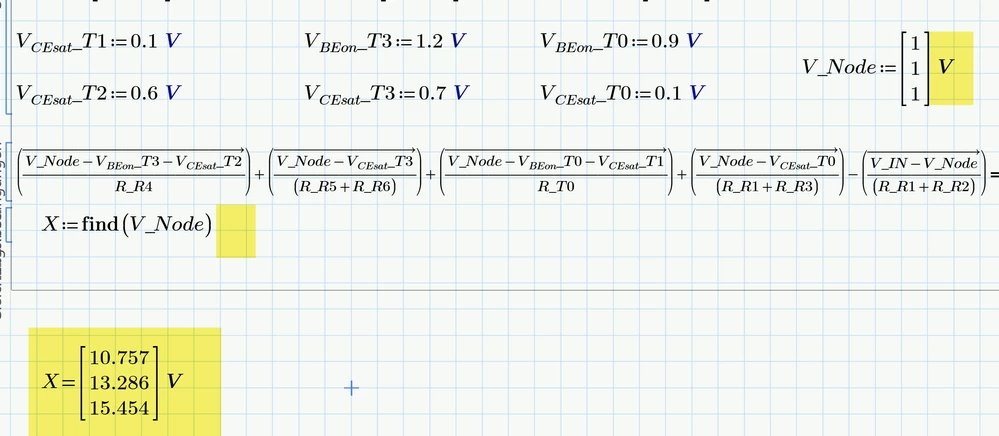
You have to apply the correct unit (volt) at your guess vector.

And don't use the boolean (comparison) equal (the fat one) if you want to show the value of the result.

Either use the 'normal' equal sign or do without and evaluate the solution in a separate region after the solve block.

BTW, the definitions of your variables and vectors should better be placed in front of the solve block. So the solve block only contains the guesses and the equation(s) to solve.

Werner_E_0-1753287051991.png


2 replies

21-Topaz II
July 23, 2025

Capture.JPG

Simply a missing unit.

Cheers

Terry

IN_Naga8-GravelAuthor
8-Gravel
July 25, 2025

Thanks for the Solution, It was of Great help.  😀👍

Werner_E25-Diamond IAnswer
25-Diamond I
July 23, 2025

You have to apply the correct unit (volt) at your guess vector.

And don't use the boolean (comparison) equal (the fat one) if you want to show the value of the result.

Either use the 'normal' equal sign or do without and evaluate the solution in a separate region after the solve block.

BTW, the definitions of your variables and vectors should better be placed in front of the solve block. So the solve block only contains the guesses and the equation(s) to solve.

Werner_E_0-1753287051991.png


25-Diamond I
July 23, 2025

You may also consider using the "root" function instead of the solve block and you may also turn the whole calculation into a function in all  14 input variables. That way you could always evaluate it for any values you like and of course also vectorized with your vector inputs:

Werner_E_0-1753287943166.png

Prime 11 worksheet attached

IN_Naga8-GravelAuthor
8-Gravel
July 25, 2025

This method is new to me; Will try and experiment for answer with this method also; Thanks 😀