1-Visitor
January 21, 2022
Solved

Solving for values in a table

  • January 21, 2022
  • 2 replies
  • 4586 views

Would love help with this.  I've defined my function, inserted a table of values, and am expecting results in a vector format. 
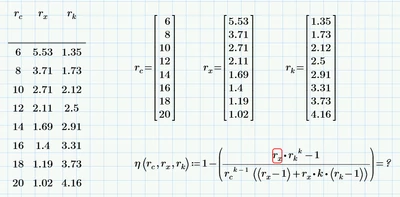
MH_10178519_0-1642774552767.png

HELP!!

Best answer by MH_10178519

Ahhh, thanks a ton!  This worked!  Next is to figure out how to plot!  


Thanks a bunch.

M


2 replies

23-Emerald IV
January 21, 2022

Please attach the Prime worksheet, not just/only a picture.

Some upfront advice:

1. Make sure that k is defined.

2. Vectorize the expression at the right-hand side of the definition.

3. DON'T evaluate a definition. That is: do NOT put an '=' at the end of a definition. It may work in many cases, but in ever so many cases it leads to problems. Use a separate region to evaluate your expression.


Success!
Luc

25-Diamond I
January 21, 2022

You have to delete the equal sign after the function definition and evaluate the function in a separate region.

Furthermore I guess you will have to vectorize the function call as you will get wrong results otherwise.

I second what Luc already said - attach the worksheet!


EDIT: Ahh, I see that in the meanwhile Luc has edited his reply and suggests quite the same 😉

Another option would be that you don't define a function but a simple variable eta:=...
In this case you would have to use vectorization as well but you could use inline evaluation (the = after the definition). But for some reason inline evaluations have proven to be instable in some situations and so I suggest not using it.

BTW, inline evaluation never works when defining a function.


1-Visitor
January 21, 2022

File attached....


I am really new at this so I appreciate the patience...


When you say "vectorize" the function, how is that accomplished?  

1-Visitor
January 21, 2022

Whoops, sorry, I was working on a different computer and the file did not save.  I'll upload revised shortly.
