
1-Visitor
February 22, 2016
Question

Solving system of equations with conditional statement

  • February 22, 2016
  • 2 replies
  • 4241 views

Hi,

I am just now discovering all that Mathcad can do and I am having trouble with solving a system of equations that includes a conditional statement.  If I manually input the statements into the system of equations (at the end), it solves it correctly, but I would like the equations to change based on the selection of LL case.  Any help would be appreciated!
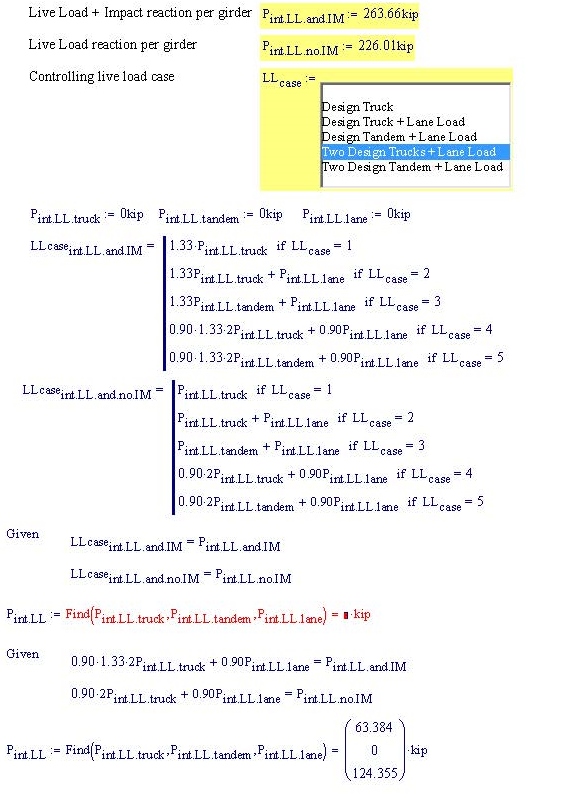
Mathcad Question.jpg

Thanks,

Nichole

2 replies

1-Visitor
February 22, 2016

I think you need to change your LLcase conditional statements so that they are functions of your three loads.  For example:

LLcase.int.LL.and.IM(P.int.LL.truck, P.int.LL.tandem, P.int.LL.lane) := ...

If that doesn't work, please post your worksheet (you can attached files by clicking "use advanced editor").

nc-21-VisitorAuthor
1-Visitor
February 22, 2016

Mark,

Thank you for the response.  I'm still unable to get it to work.  I'm not that I understand all of the functions in the evlatuation toolbar (and haven't been able to find good examples that show the differences) so maybe I am using the incorrect one.

Thanks,

Nichole

15-Moonstone
February 22, 2016

The problem may be with the programs.  The last line of the program will always be return.  You need to change the if statements to:

return x if case = 1

return y if case =2

etc.

nc-21-VisitorAuthor
1-Visitor
February 22, 2016

Thanks, David.  I'm still missing something....

25-Diamond I
February 22, 2016

Mark has correctly suggested that you should use functions and you did it half way right. What you were missing was that you have to use those function in the solve block, too. That means not just the function names but providing the variables you wish to solve for as arguments, too.

Using "return" in every line is not necessary as your cases don't overlap and I don't think that the gain in performance speed is significant. But if you consider it good programming style, you may add those returns again. You may consider adding an "otherwise" line at the end of the functions to provide a value in case  LL.case is not an integer in the range of 1 to 5 (0 for instance).

You have three variables you want to solve for, but only two equations. But looking at your cases you always (apart from case 1) have only two variables involved. So Mathcad solves for those two and the third will remain 0 kip.

For LL.case=1 the solve block returns an error as no solution can be found. Thats understandable, because if you look at your equations in that case, you demand Mathcad to find a solution for the "system" consisting of the two equations

which obviously has no solution as "truck" can't be 198.241 kip (solution from the first equation) AND 263.66 kip at the same time

You would need to set CTOL:=10^5 to get Mathcad think it found a "solution"

Regards, Werner