11-Garnet
June 19, 2017
Question

Spreadsheet for single and multiple input

  • June 19, 2017
  • 1 reply
  • 1023 views

Hi,


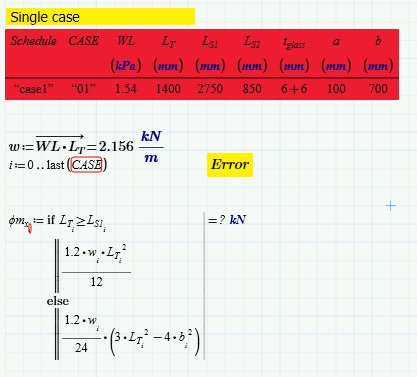
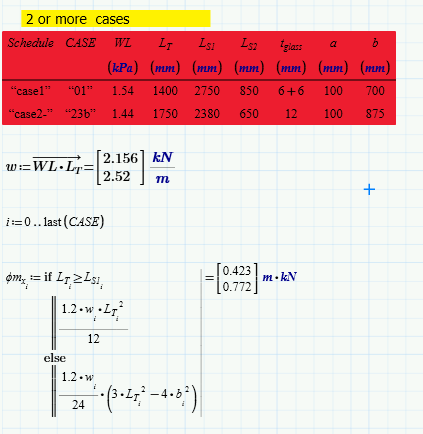
I made a spreadsheet that are applicable only for 2 or more inputs . As you can see, when I  have a single case my spreadsheet  the error ask the value must be a vector. What should I add in the program, so that the spreadsheet will compute  even if I have  a single case only.
 

1 reply

25-Diamond I
June 19, 2017

Thats a problem with the way the new "tables" in Prime are working. If there is just one row of data, no vectors are created but simple scalars. This usually is what the user expects and wishes for, but in your case isn't.

So you either may create the 1 x 1 vectors yourself under the table by writing  CASE:=stack(CASE)       WL:=stack(WL)        Lr:=stack(Lr)            etc.

This will do no harm if the variables already are vectors but will create a vector if they are scalars.

Or you may add a dummy row of data consisting of NaN's (or duplicating the values in the first row) if that doesn't disturb your further calculations too much.