8-Gravel
February 25, 2025
Solved

Stack and sort a vector up to calculated z value

  • February 25, 2025
  • 1 reply
  • 732 views

Hi All,


What is the formula to stack the zcal into a vector and rearrange the vector up to the zcal value. Can anyone please advice?
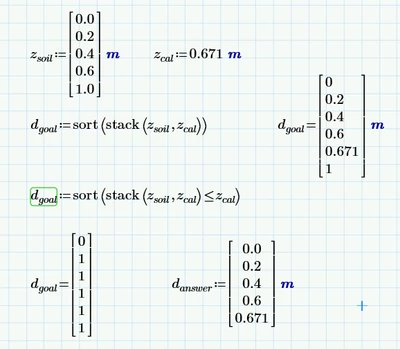

 

davidlimtw_0-1740478635831.png


Best answer by Werner_E

Why didn't you attach your worksheet?


Try

Werner_E_0-1740487392477.png

This approach will fail if no value in z.soil is larger than z.cal.

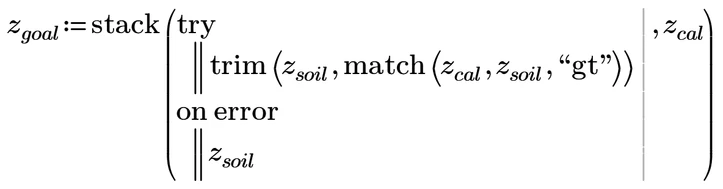
If this is a problem, you may use tray and catch to cope with it

Werner_E_1-1740487582490.png


Remarks

Now this approach would give a wrong result if ALL values in z.soil are larger than z.cal.

If z.cal is equal to a value in z.soil, this value will be seen twice at the end of the resulting vector - not sure if this is desired behaviour.

If the values in z.soil are not sorted, you should use sort(trim(....)).


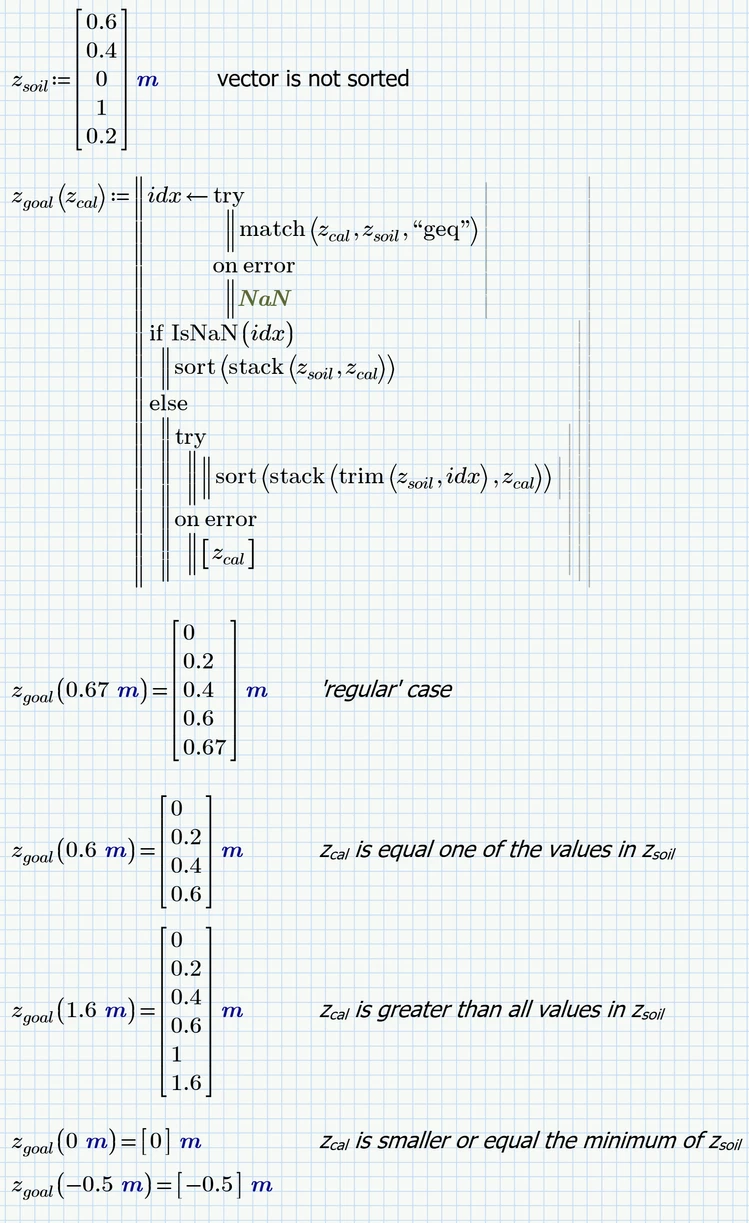
Here is a version which also considers these points. I formulated it as function of z.cal because this makes testing all possible cases easier

Werner_E_3-1740489956616.png


1 reply

Werner_E25-Diamond IAnswer
25-Diamond I
February 25, 2025

Why didn't you attach your worksheet?


Try

Werner_E_0-1740487392477.png

This approach will fail if no value in z.soil is larger than z.cal.

If this is a problem, you may use tray and catch to cope with it

Werner_E_1-1740487582490.png


Remarks

Now this approach would give a wrong result if ALL values in z.soil are larger than z.cal.

If z.cal is equal to a value in z.soil, this value will be seen twice at the end of the resulting vector - not sure if this is desired behaviour.

If the values in z.soil are not sorted, you should use sort(trim(....)).


Here is a version which also considers these points. I formulated it as function of z.cal because this makes testing all possible cases easier

Werner_E_3-1740489956616.png


25-Diamond I
February 25, 2025

Here is a shorter approach which avoids Try and catch and deals with the 'special' cases with simple if-statements, which might be better readable and understandable.

Werner_E_0-1740494597105.png


8-Gravel
February 25, 2025

Hi Werner,


Thanks for posting the solution. I found another solution in the forum from another user, I've done some modified in the loop and got the answer, Obviously your solution is better that captures the possibility of value more than the specified range. I will take your formula into my calculation. 


davidlimtw_0-1740494856803.png