
7-Bedrock
August 4, 2022
Solved

Strange behavior with Mathcad 15

  • August 4, 2022
  • 1 reply
  • 1339 views

I am not getting why this is evaluating in such a way in Mathcad 15

Best answer by terryhendicott

Hi

You can use a setting in the worksheet options:

Simply uncheck the use exact comparisons option.
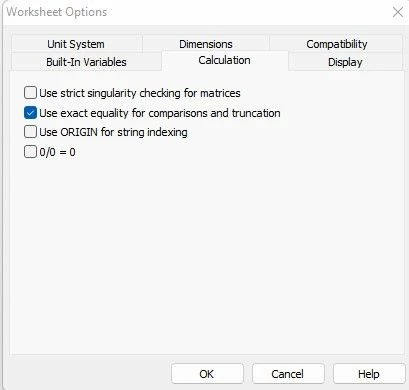
Capture.JPG

If you uncheck the exact equality option you get the behavior desired.
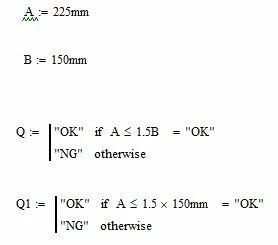
Capture3.JPG 

Cheers

Terry

1 reply

21-Topaz II
August 4, 2022

Hi

Internal precision at 17 decimal places A and 1.5B are not the same. 

Capture.JPG

7-Bedrock
August 4, 2022

Thank you for explanation I was just wondering if there is any option with mathcad 15 to change this behavior with variable?

21-Topaz II
August 4, 2022

Hi

You can use a setting in the worksheet options:

Simply uncheck the use exact comparisons option.

Capture.JPG

If you uncheck the exact equality option you get the behavior desired.

Capture3.JPG 

Cheers

Terry
