
1-Visitor
December 20, 2023
Solved

Struggling to write if/else statements with variable ranges

  • December 20, 2023
  • 1 reply
  • 2094 views


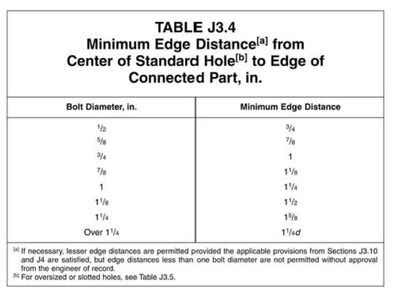
I am looking to write some code for a structural connection design template. One of the things that needs to be checked is plate geometry. More specifically the distance from the centerline of a bolt hole to the edge of the plate the hole is in. The table below outlines the general parameters I am trying to meet. 
AS_10119570_0-1703082611432.png

lets call the bolt diameter "d" and the min edge distance "x",

for 0.5 <= d <= 1

if x >= d + 0.25 then return "meets spec". if not then return "violates spec"


for 1 < d <= 1.25

if x >= d + 0.375 then return "meets spec". if not then return "violates spec"


for d > 1.25

if x >= d * 1.25 then return "meets spec". if not then return "violates spec"


Basically, I want to put in various values for "d" and "x" and have it tell me whether or not I meet the spec per the rules above. I feel like this should be rather simple to code in but I have no coding experience so I am struggling hard with it.
 

AS_10119570_0-1703087835526.png

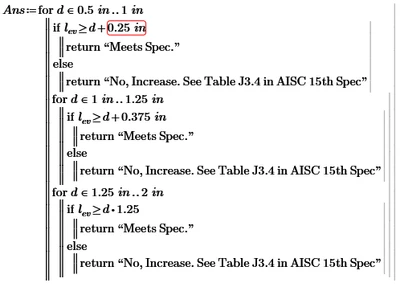
Above is a snippet of the code I have tried to write for it (note that "x" = "lev" in the actual code

Best answer by LucMeekes

The other construct, is also supported by Prime 9.

To code an IF you can use the programmatic IF, that you used in you program.

Terry used the IF function which is defined as:

 if ( <boolean> , <value if true> , <value if false> )

Example:

b := if ( x > 0 , 5 , 3 )

Assign to b the value 5 if x >0, and 3 otherwise.


To your program:

Your first test check if d is within 0.5 to 1 and if that's the case, then you have other tests, such as whether d is between 1 and 1.25. Well, the program only gets to that test if d is between 0.5 and 1, so the test for d between 1 and 1.25 always returns false.

The else statement at the end returns false for all values of d outside the range from 0.5 to 1...


Success
Luc

1 reply

21-Topaz II
December 20, 2023
1-Visitor
December 20, 2023

Hello, thanks for the help, I am using mathcad prime 9.0.0.0 so the visual of the syntax is different:

AS_10119570_0-1703089047913.png

I have tried to match what you had coded, it seems to work for values of 0.5 < d < 1 but anything over 1 it doesnt work as seen in my snippet where it should say "meets spec" when I input a value of 1.5 for d and 1.875 for lev

24-Ruby III
December 20, 2023

MartinHanak_0-1703093251461.png