
19-Tanzanite
May 1, 2024
Solved

Subscript and Superscript keyboard in text in Mathcad Prime 10 wrong defined?

Hi,

Why is it written that for subscript in text one needs to press ctrl+- and for superscript in text one needs to press ctrl++, while if someone press ctrl+- and ctrl++ it comes out of the way of being able to use subscript and superscript in the text. Is this indication written wrongly?
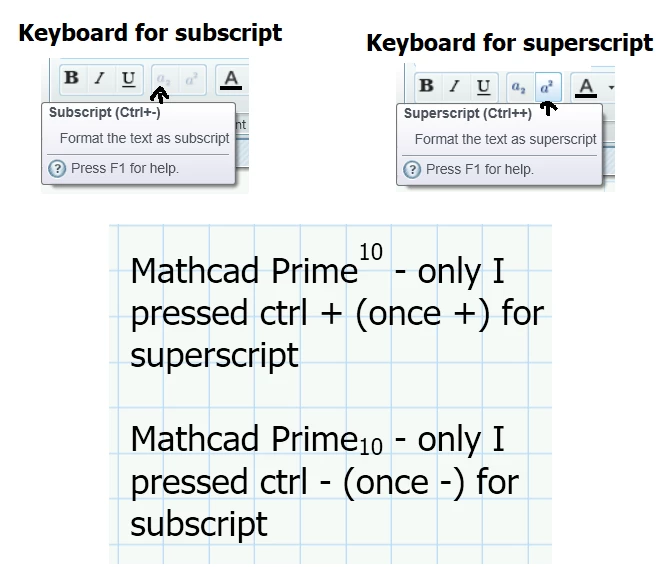
Cornel_0-1714578420550.png


CornelAnswer
19-Tanzanite
May 1, 2024

But maybe I think I misunderstand, and that it is about ctrl and(=+) - and ctrl and(=+) +

2 replies

Cornel19-TanzaniteAuthorAnswer
19-Tanzanite
May 1, 2024

But maybe I think I misunderstand, and that it is about ctrl and(=+) - and ctrl and(=+) +

Translate
DJNewman
19-Tanzanite
May 1, 2024

Yeah, all of the keyboard shortcuts are written that way where + is meant to be "and".

On a keyboard for superscript you're really pressing ctrl and the = key, as opposed to ctrl and shift and =. (shift and = normally being how you produce a + sign)

If they want you to press shift they'll say so, like the keyboard shortcut for Summation as opposed to the keyboard shortcut for Polar plots.


DJNewman_0-1714583568959.png

DJNewman_1-1714583586664.png


Compare to the equation break operator for addition.

DJNewman_2-1714584063989.png


They could express it as ctrl + = or ctrl + shift + = (or Summation as ctrl + shift + 4) but I guess they also want to express the keyboard shortcuts as intuitive where possible. (Where you associate the plus sign with addition or subscripts.)

Translate
PTC Marketer for Creo and Mathcad. I run their YouTube channels, some Creo campaigns, and all Mathcad campaigns and communications.